Maximize bandwidth (SLA) strategy
When using Maximize Bandwidth mode (load-balance in the CLI), SD-WAN will choose all of the links that satisfies SLA to forward traffic based on a load balancing algorithm. The load balancing algorithm, or hash method, can be one of the following:
|
round-robin |
All traffic are distributed to selected interfaces in equal portions and circular order. This is the default method, and the only option available when using the GUI. |
|
source-ip-based |
All traffic from a source IP is sent to the same interface. |
|
source-dest-ip-based |
All traffic from a source IP to a destination IP is sent to the same interface. |
|
inbandwidth |
All traffic are distributed to a selected interface with most available bandwidth for incoming traffic. |
|
outbandwidth |
All traffic are distributed to a selected interface with most available bandwidth for outgoing traffic. |
|
bibandwidth |
All traffic are distributed to a selected interface with most available bandwidth for both incoming and outgoing traffic. |
When the inbandwidth, outbandwidth), or bibandwidth load balancing algorithm is used, the FortiGate will compare the bandwidth based on the configured upstream and downstream bandwidth values.
The interface speedtest can be used to populate the bandwidth values based on the speedtest results. See Manual interface speedtest for details.
To manually configure the upstream and downstream bandwidth values:
config system interface
    edit <interface>
        set estimated-upstream-bandwidth <speed in kbps>
        set estimated-downstream-bandwidth <speed in kbps>
    next
end

|
ADVPN is not supported in this mode. |
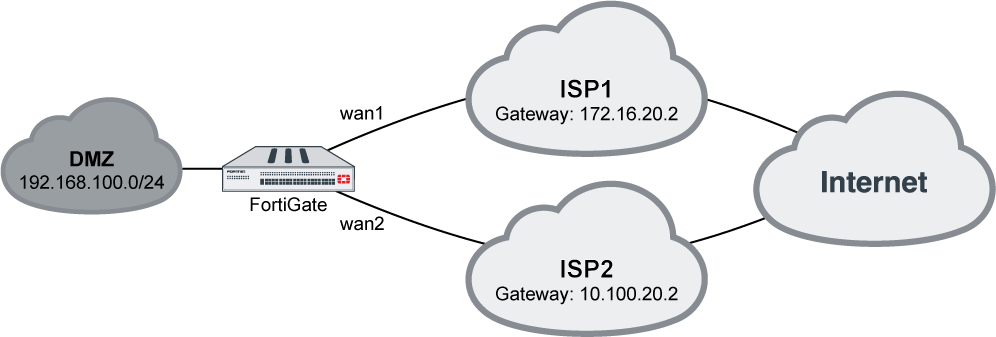
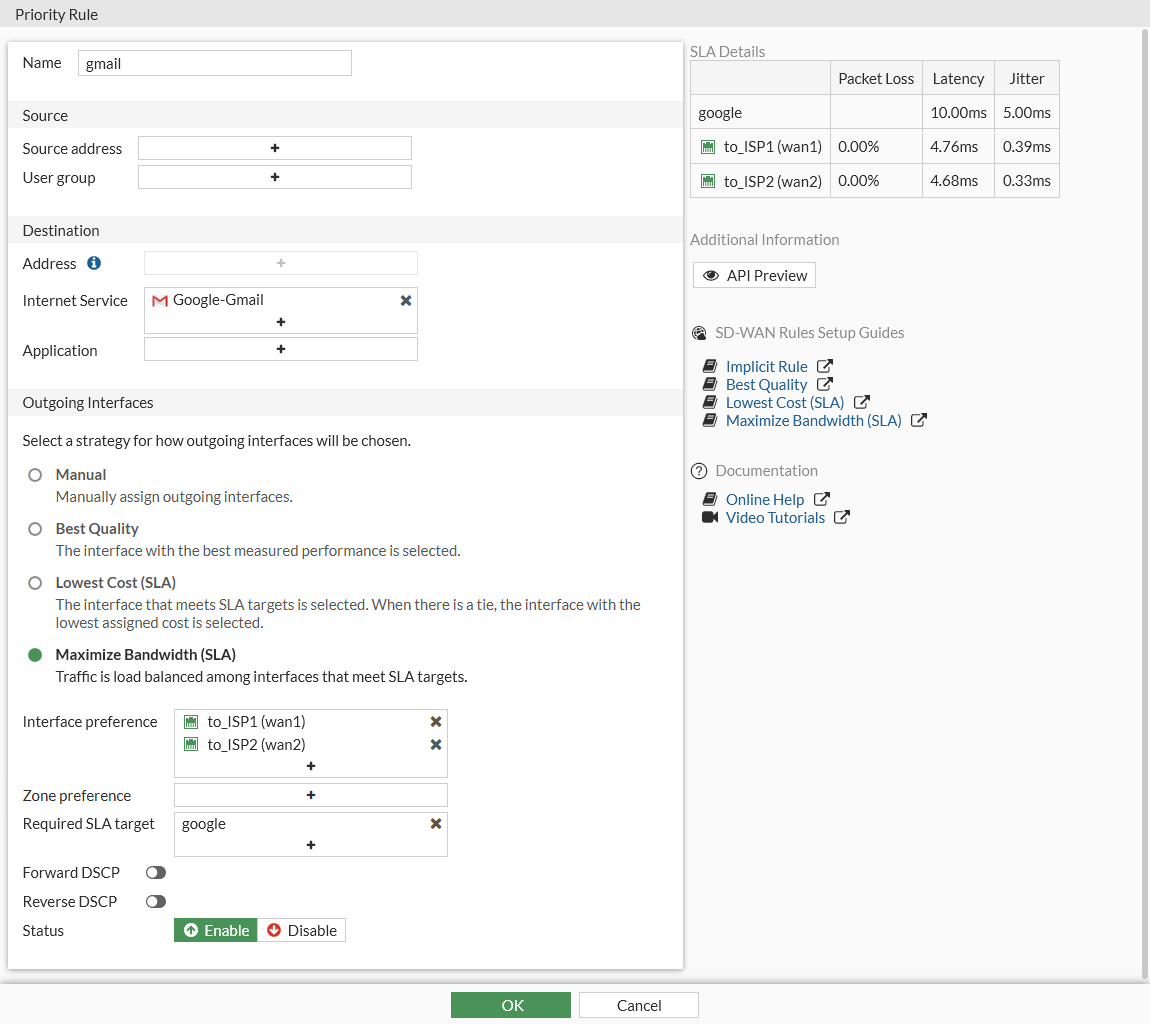
In this example, your wan1 and wan2 SD-WAN interfaces connect to two ISPs that both go to the public internet. You want to configure Gmail services to use both of the interface, but the link quality must meet a standard of latency: 10ms, and jitter: 5ms. This can maximize the bandwidth usage.
To configure an SD-WAN rule to use Maximize Bandwidth (SLA):
- On the FortiGate, add wan1 and wan2 as SD-WAN members, then add a policy and static route. See SD-WAN quick start for details.
- Go to Network > SD-WAN, select the Performance SLAs tab, and click Create New.
- Enter a name for the performance SLA, such as google, and set the Server to google.com.
- Enable SLA Target. Set the Latency threshold to 10 ms, and the Jitter threshold to 5 ms. See Health checks for more details.
- Click OK.
- Go to Network > SD-WAN, select the SD-WAN Rules tab, and click Create New.
- Enter a name for the rule, such as gmail.
- Configure the following settings:
Field
Setting
Internet Service
Google-Gmail
Strategy
Maximize Bandwidth (SLA)
Interface preference
wan1 and wan2
Required SLA target
google
- Click OK.
To configure an SD-WAN rule to use SLA:
config system sdwan
    config health-check
        edit "google"
            set server "google.com"
            set members 1 2
            config sla
                edit 1
                    set latency-threshold 10
                    set jitter-threshold 5
                next
            end
        next
    end
    config service
        edit 1
            set name "gmail"
            set addr-mode ipv4
            set mode load-balance
            set hash-mode round-robin
            set internet-service enable
            set internet-service-name Google-Gmail
            config sla
                edit "google"
                    set id 1
                next
            end
            set priority-members 1 2
        next
    end
end

|
The CLI command |
To diagnose the performance SLA status:
FGT # diagnose sys sdwan health-check google
Health Check(google):
Seq(1): state(alive), packet-loss(0.000%) latency(14.563), jitter(4.334) sla_map=0x0
Seq(2): state(alive), packet-loss(0.000%) latency(12.633), jitter(6.265) sla_map=0x0

FGT # diagnose sys sdwan service 1
Service(1): Address Mode(IPV4) flags=0x0

    TOS(0x0/0x0), Protocol(0: 1->65535), Mode(load-balance)
    Members:<<BR>>

        1: Seq_num(1), alive, sla(0x1), num of pass(1), selected
        2: Seq_num(2), alive, sla(0x1), num of pass(1), selected

    Internet Service: Google.Gmail(65646)
When both wan1 and wan2 meet the SLA requirements, Gmail traffic will use both wan1 and wan2. If only one of the interfaces meets the SLA requirements, Gmail traffic will only use that interface.
If neither interface meets the requirements but health-check is still alive, then wan1 and wan2 tie. The traffic will try to balance between wan1 and wan2, using both interfaces to forward traffic.