

SNMP traps and query for monitoring DHCP pool
The SNMP DHCP event contains three traps and one query.
Traps are sent when:
- DHCP server IP pool usage reaches 90%
- DHCP server detect an IP address that is already in use
- DHCP client receives DHCP NAK
SNMP queries are accepted for DHCP lease usage information (OID = 1.3.6.1.4.1.12356.101.23). The query result is based on the leased out percentage.
To enable the SNMP DHCP event in the GUI:
- Go to System > SNMP.
- Click Create New in either the SNMP v1/v2c table or SNMP v3 table, or edit an existing community or user.
- Configure the settings as required.
- In the SNMP Events list, enable DHCP addresses at limit.
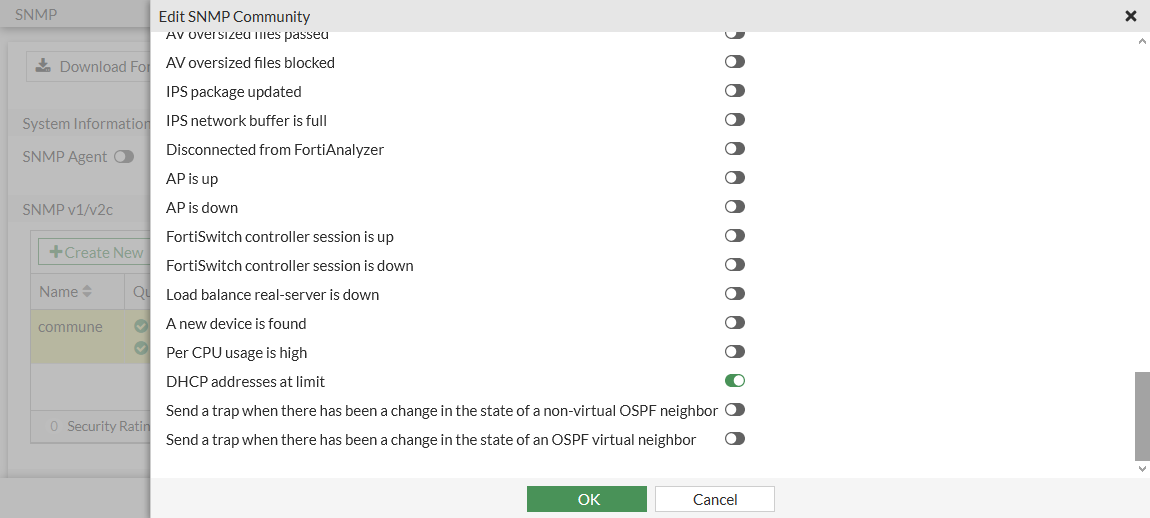
- Click OK.
To enable the SNMP DHCP event in the CLI:
config system snmp community
    edit 1
        set name "REGR-SYS"
        config hosts
            edit 1
                set ip 10.1.100.11 255.255.255.255
            next
            edit 2
                set ip 172.16.200.55 255.255.255.255
            next
        end
        set events dhcp
    next
end
config system snmp user
edit "1"
set notify-hosts 172.10.1.0 172.20.1.0
set events dhcp
set security-level auth-priv
set auth-proto sha384
set auth-pwd ********************
set priv-proto aes256
set priv-pwd *********************
next
end