

Terraform examples and modules
Fortinet provides Terraform examples and modules for deploying FortiGate-VM on Azure.
See the following for resources:
- GitHub: https://github.com/fortinetdev/terraform-azurerm-cloud-modules
- Terraform registry: https://registry.terraform.io/modules/fortinetdev/cloud-modules/azurerm/latest
To use an example as a Terraform project:
- Clone the module to your environment.
- Go to the example folder (e.g
examples/). - Edit
terraform.tfvars.templateand rename it toterraform.tfvars. - Execute the following commands:
terraform init
terraform apply
To use an example or module as a module:
- Create a new folder and add a file named
main.tfwithin this folder. - In
main.tf, specify the module source by referencing the target example, and provide appropriate values for the required parameters. Each example includes a terraform.tfvars.template file that can serve as a reference. such as:module "your_module_name" { source = "fortinetdev/cloud-modules/azurerm/examples/<example_name>" … <Specify module variables> … } - Execute the following commands:
terraform init
terraform apply
Examples and modules
Extlb_fgtasg_intlb
The extlb_fgtasg_intlb example demonstrates how to integrate a FortiGate VM scale set (VMSS) with both an external load balancer (LB) and an internal load balancer (ILB) within an Azure environment. This design ensures seamless traffic inspection for inbound, outbound, and east-west traffic, providing both security and efficient traffic management for Azure-hosted services.
The FortiGate instances in the VMSS actively communicate with each other and the Azure fabric, ensuring consistent network traffic inspection. This design is particularly effective for environments that require a high level of security, such as enterprise applications or services that handle sensitive data.
This example leverages user-defined routing to guide traffic to the FortiGate VMSS for inspection. Azure’s public and internal load balancers direct traffic destined for the FortiGate firewall, allowing all inbound, outbound, and east-west traffic to be inspected before proceeding to their destinations.
|
Traffic direction |
Description |
|---|---|
|
Inbound |
Traffic originating from the internet or on-premise networks, targeting services published via the Azure load balancer. |
|
Outbound |
Traffic originating from the internal Azure network (peered virtual networks) destined for external internet services. |
|
East-west |
Traffic flowing between peered virtual networks within the Azure environment. |
The design provides flexibility, allowing you to choose whether the FortiGate inspects east-west traffic through the configurable enable_east_west_traffic parameter.
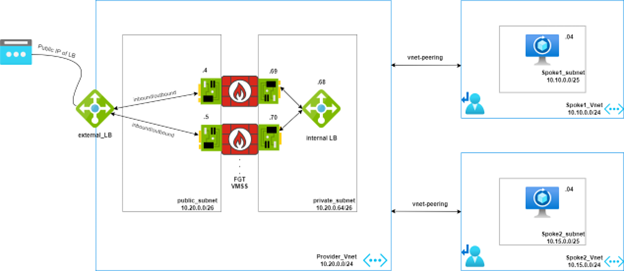
See GitHub.
applb_gwlb_fgtasg
The applb_gwlb_fgtasg example demonstrates the integration of a VMSS with Azure gateway load balancer (GWLB) for seamless traffic inspection of consumer applications. Traffic from a standard load balancer, which fronts consumer applications, is redirected to the GWLB for inspection. FortiGate-VMs can be shared across multiple applications, even those in different subscriptions, allowing for traffic inspection with minimal changes when new consumer applications are added. This integration enables managed security service providers to deliver advanced threat protection through FortiGate-VMs deployed behind the GWLB, offering comprehensive security across various consumer applications.
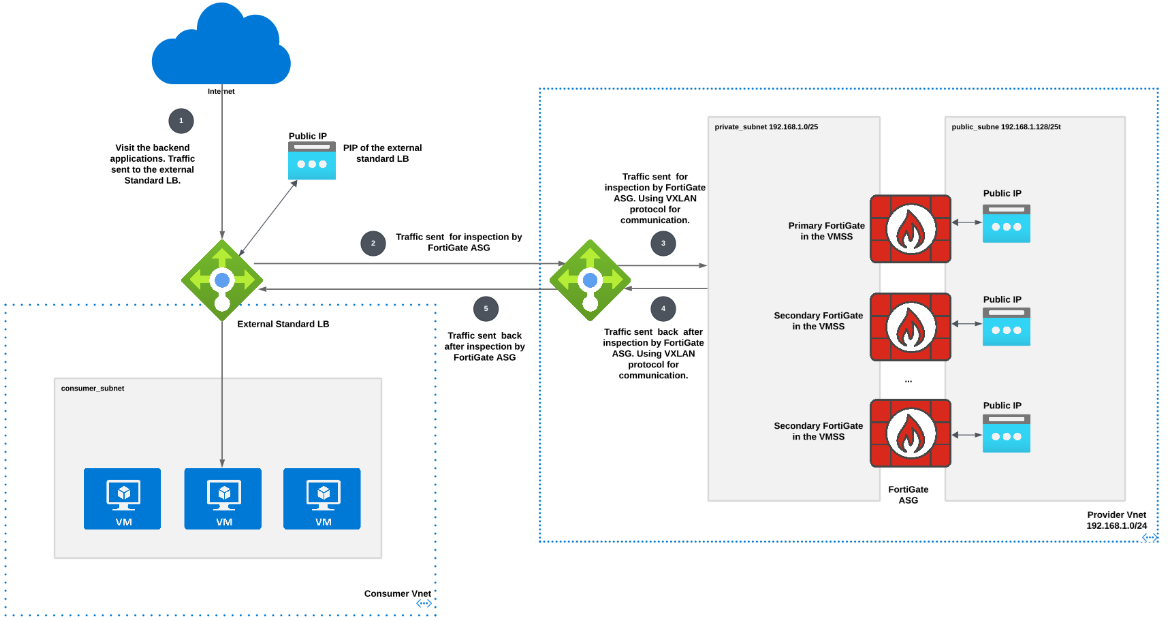
See GitHub.
Single FortiGate
You can use this module to quickly deploy one FortiGate. See GitHub.
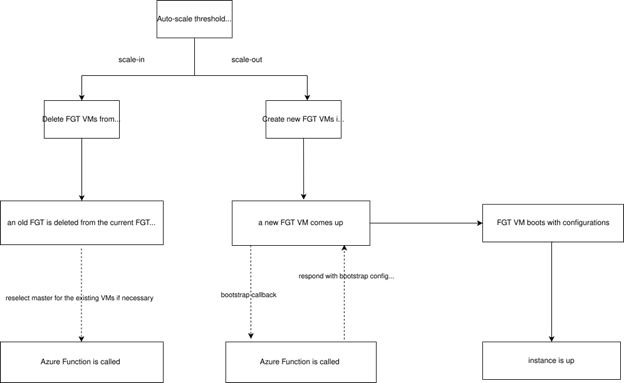
Autoscale workflow chart
Azure function workflow diagram
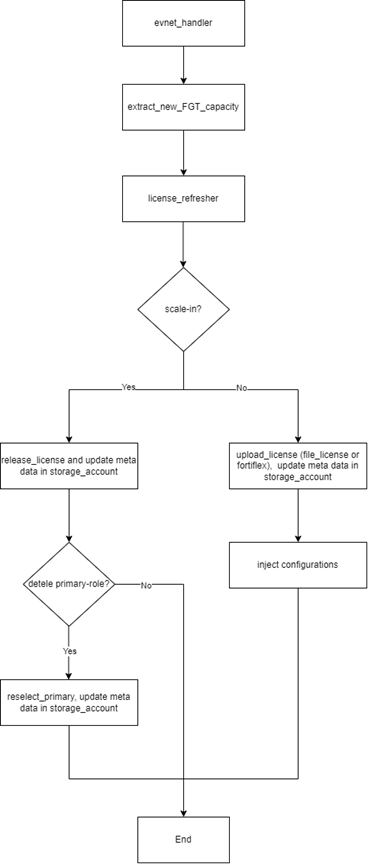
Image version update
You can update the FortiGate image version using the image_version variable under the fortigate_scaleset block for each autoscaling group (ASG) example. Users must specify a particular version number. To view all supported versions on Azure Cloud, run the following command:
az vm image list -o table --all --publisher fortinet --offer fortinet_fortigate-vm_v5

|
If you update |