

Creating a site
You can create a new site from the Site. SD-WAN sites are authorized FortiGate devices. Use SD-WAN overlay to add your FortiGates to the site. You can assign the site as:
|
Role |
Description |
|---|---|
|
Branch |
Organization site that needs to access headquarter applications |
|
Data center |
Organization headquarters that maintain business applications |
You must set the hub locations before you can add a new site. See Creating the initial topology.
To create a new site:
-
Go to SDWan Overlay > Site.
-
Click Create.
-
Enter the Name.
-
On the Deployment tab, set the site as a Branch or Data Center.
-
(Optional) Enter a Description.
-
Enter the SLA Latency Threshold.
-
Select the FortiGate device to provision from the Device dropdown menu.
It is critical for the added FortiGate device to appear with a status of Online. If the device lacks a status of Online, check whether the device is:
-
Powered on.
-
Activated or logged in to FortiGate Cloud.
-
Configured and properly connected to its internet service provider’s WAN link.
-
- Click OK.
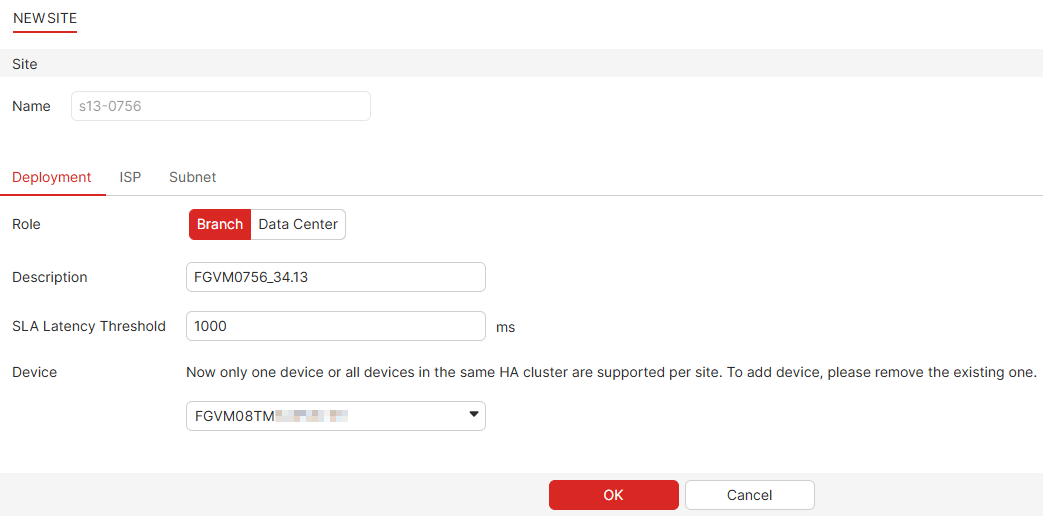
Adding HA clusters to sites
HA clusters that have been set up outside of FortiGate Cloud can be added to a site when selecting the Device. To implement an HA cluster in FortiGate Cloud, select the primary FortiGate as the Device when adding a site. The secondary FortiGate in the HA cluster will be added to the Device List for Deployment.
See High Availability in the FortiOS Administration guide for more information on HA clusters.