
Fortinet white logo
Fortinet white logo

Administration Guide

Frequently asked questions

Frequently asked questions

What do I do if FortiOS returns an Invalid Username or Password/FortiCloud Internal Error/HTTP 400 error when activating FortiGate Cloud on the FortiOS GUI?

  1. Ensure that you can log into FortiGate Cloud via a web browser using the same username and password that you attempted to activate FortiGate Cloud with on the FortiOS GUI.
  2. Confirm that the FortiGate can telnet logctrl1.fortinet.com or globallogctrl.fortinet.net via port 443.
  3. Ensure that the FortiGate Cloud account password length is fewer than 20 characters.
  4. If the FortiGate is a member of a high availability (HA) pair, ensure that you activate FortiGate Cloud on the primary device. Activate FortiGate Cloud on the primary FortiGate as To provision a FortiGate or FortiWifi to FortiGate Cloud in the FortiOS GUI: describes. FortiGate Cloud activation on the primary FortiGate activates FortiGate Cloud on the secondary FortiGate. Local FortiGate Cloud activation on the secondary FortiGate will fail.
  5. Enable FortiGate Cloud debugging in the CLI. The get command displays the device timezone, while the diagnose debug console timestamp enable command shows the date timestamp for the debug logs.
    config system global
        get
    end
    diagnose debug console timestamp enable
    execute fortiguard-log domain
    diagnose debug application forticldd -1
    diagnose debug enable
    execute fortiguard-log login email password

    Email any debug output to admin@forticloud.com.

  6. If you see the HTTP 400 error, enable HTTP debug with the diagnose debug application httpsd -1 command.

Why can I log into the FortiGate Cloud but not activate the FortiGate Cloud account in FortiOS with the same credentials?

FortiOS 5.4 and older versions do not support passwords with special characters. If you are running FortiOS 5.4 or an older version and attempting to activate a FortiGate Cloud account with a password that includes special characters, the activation fails. You must remove special characters from the password, or upgrade to FortiOS 5.6 or a later version.

How can I activate my FortiGate Cloud on HA-paired FortiGates?

To activate FortiGate Cloud for an HA pair, all members of the cluster, including both primary and secondary units, must be provisioned to the same FortiGate Cloud account.

If an HA unit is replaced, the replacement device must be provisioned to the same FortiGate Cloud account before it joins and forms the new HA cluster.

How can I establish a management tunnel connection between my FortiGate and FortiGate Cloud?

Do one of the following:

  • If you have not activated FortiGate Cloud in FortiOS for the first time, follow the steps in FortiCare and FortiGate Cloud login.
  • Otherwise, if you have already activated FortiGate Cloud, run the following commands in FortiOS to establish a connection manually:

    config system central-management

    set type fortiguard

    end

    diagnose fdsm contract-controller-update

    fnsysctl killall fgfmd

What do I do if a FortiGate added by its cloud key stays in an inactive state for more than 24 hours?

  1. Check the FortiGate network settings and ensure that port 443 is not blocked.
  2. Connect via Telnet to logctrl1.fortinet.com or globallogctrl.fortinet.net (if FortiOS supports Anycast) through port 443.
  3. In the FortiOS GUI, activate FortiGate Cloud as To provision a FortiGate or FortiWifi to FortiGate Cloud in the FortiOS GUI: describes.

What do I do if the "Device is already in inventory" message appears when importing a FortiGate by key?

This message means that the device has already been added to an account inventory. Another user may have tried to add the device to another account. If you cannot find the device on the Inventory page, contact cs@fortinet.com.

What do I do if the invalid key message appears when importing a FortiGate by key?

The FortiCloud key is for one-time use only. Log into the FortiGate and activate FortiGate Cloud as To provision a FortiGate or FortiWifi to FortiGate Cloud in the FortiOS GUI: describes instead. If you cannot connect to the FortiOS GUI, contact cs@fortinet.com to reenable the key.

What do I do if FortiGate Cloud activation via the FortiOS GUI succeeds, but I cannot find the FortiGate in the FortiGate Cloud portal?

When a new FortiGate is added to FortiGate Cloud, FortiGate Cloud dispatches it to the global or Europe region based on its IP address geolocation. If the FortiGate warranty region is Japan, FortiGate Cloud dispatches it to the Japan region.

How can I use the CLI to access the root VDOM on FortiOS 7.6.4?

When accessing the CLI inside FortiGate Cloud, the default VDOM is not the usual root VDOM if FortiGate is running FortiOS 7.6.4.

To check the current VDOM, run get sys stat. The following example shows the output when accessing the device through FortiGate Cloud:
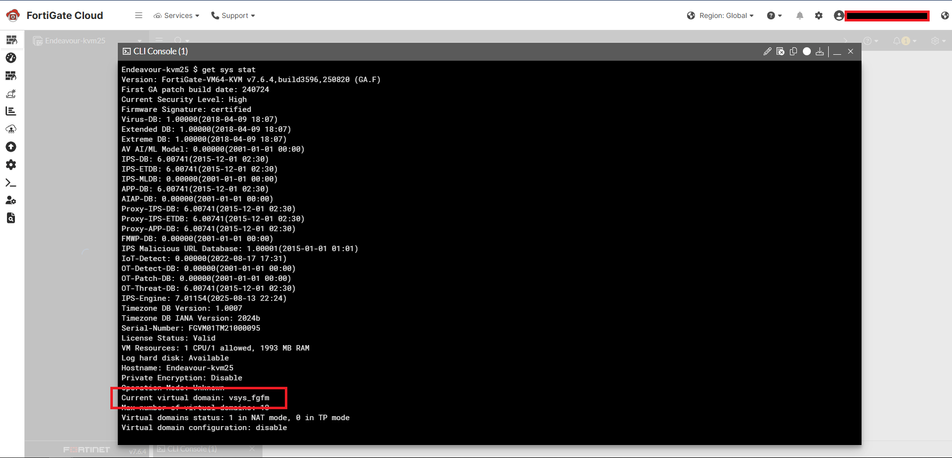
Under Current virtual domain, the VDOM is vsys_fgfm, which is usually an internal VDOM. The output for most commands will be unexpected until the correct VDOM is selected.

The following example shows the output when accessing the device directly. Notice the default is root:
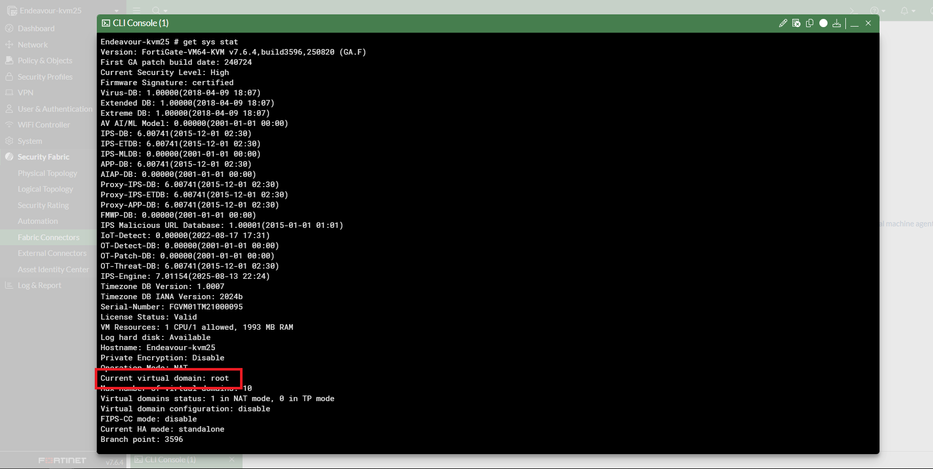
To select the correct VDOM when using FortiGate Cloud, run exec enter root to manually move the CLI session to the correct VDOM.

How can I move a FortiGate from region A to region B?

  1. Log in to FortiGate Cloud region A.
  2. Deprovision the device.
  3. Verify that the device has returned to the Devices and Provisioning > Device List > FortiGate list.
  4. Switch the portal to region B.
  5. Go to Devices and Provisioning > Device List > FortiGate.
  6. Click Add FortiGate.
  7. Search for the device, then click Provision to FortiGate Cloud.

How can I connect to FortiGate by remote access?

You must set the FortiOS central management setting to FortiCloud. The management tunnel status must be up. See How can I establish a management tunnel connection between my FortiGate and FortiGate Cloud?. See Accessing a FortiGate.

How can I activate FortiGate Cloud using a different email FortiCare account when FortiOS does not allow entering another email?

execute fortiguard-log login <email> <password>

What do I do if the migrate notice still appears after successful migration?

The migrate notice appears when FortiOS detects differfent email addresses used for FortiCare and FortiGate Cloud. FortiOS has a known issue that it is case-sensitive when verifying an email address. For example, FortiOS may consider example@mail.com and Example@mail.com as different email addresses. Contact cs@fortinet.com to ensure both accounts use all lower-case letters.

What do I do if FortiDeploy does not work?

  1. Ensure that the FortiManager settings are correct and the device can connect to FortiManager.
  2. Confirm that the central management setting on the device is set to FortiCloud.
  3. Ensure that the device can connect to logctrl1.fortinet.com via port 443.
  4. Import the device to the inventory by FortiCloud key. See To provision a FortiGate/FortiWifi to FortiGate Cloud using the FortiCloud key:.
  5. Provision the device to FortiManager, then power up the device. If the device is already powered up, run execute fortiguard-log join.
  6. If the FortiCloud key has been used and is invalid for reuse, log into the device GUI and activate FortiGate Cloud as To provision a FortiGate or FortiWifi to FortiGate Cloud in the FortiOS GUI: describes.
  7. If the FortiGate is running an older version of FortiOS and has just been factory‑reset, wait a few moments after it boots up to allow the certificates to download properly from FortiGuard.

What do I do if FortiOS does not upload logs?

Gather debug logs for the following commands, then send the debug output to fortigatecloud@forticloud.com. Check log upload settings on the FortiGate and ensure that it is configured to send logs to FortiGate Cloud:

execute telnet <log server IP address> 514

diagnose test application forticldd 1

diagnose test application miglogd 6

diagnose debug application miglogd -1

diagnose debug enable

diagnose test application forticldd 3

show full log fortiguard setting

What do I do if FortiGate Cloud cannot retrieve logs from FortiOS when the data source is set as FortiGate Cloud?

Ensure that you can see logs in the FortiGate Cloud portal.

In poor network conditions, increase the timeout period to avoid connection timeout:

config log fortiguard setting

set conn-timeout 120

end

You may use the Fortinet support tool Chrome extension to troubleshoot issues. See Technical Tip: Fortinet Support Tool - Google Chrome Extension for troubleshooting GUI issues.

How can I export more than 2000 lines of logs?

FortiGate Cloud only supports raw log download for FortiGates with a FortiGate Cloud Basic subscription. See To download a log:.

Why does FortiGate Cloud drop some logs from my FortiGate?

A FortiGate with implicit policy logging settings enabled uploads a large amount of redundant logs, causing processing delays and overloading on the log server. The amount of redundant logs uploaded can be large enough to block all log uploads from the FortiGate. Therefore, FortiGate Cloud drops logs matching the following conditions:

  • policyid=0
  • sentbyte=0
  • rcvdbyte=0
  • no crscore
  • subtype="local"

How can I receive a daily report by email?

Ensure that FortiGate Cloud generated the scheduled report and that you have added the email address. See Reports.

Why does FortiGate not submit files for Sandbox scanning?

Check the FortiGate settings:

  • For FortiOS 6.2 and later versions:
    • Ensure that FortiGate Cloud has been activated.
    • Go to Security Profiles > AntiVirus. Ensure that Suspicious Files Only or All Supported Files is enabled.
  • For FortiOS 6.0 and earlier versions:
    • Go to System > Feature Visibility, then enable FortiSandbox Cloud.
    • Go to Security Fabric > Settings. Enable Sandbox Inspection.
    • Go to Security Profiles > AntiVirus. Ensure that Suspicious Files Only or All Supported Files is enabled.
    • Go to Policy & Objects > IPv4 Policy. Enable antivirus for the policy in use.

What backup retention does FortiGate Cloud provide?

Backup does not have storage limits. For devices with an active subscription, the retention period is one year.

How does automatic backup work?

Automatic backup is either per session or day. FortiGate setting changes from FortiOS or FortiGate Cloud trigger backup. If there is no changes to FortiGate settings, FortiGate Cloud does not perform a backup. See To schedule an automatic backup:.

What does it mean if a geolocation attribute configuration change log/alert is received?

This is a feature to sync a FortiGate device's geolocation information between the FortiOS GUI, FortiGate Cloud, and the Asset Management portal. When a new device is being provisioned, or there is a change in a provisioned device's IP address, or a user moves a device to another location on the map view, its new geolocation attributes are pushed to the device via the management tunnel with username as FortiGateCloud. Since the geolocation database may not be entirely accurate, it is possible that a device is placed at a wrong location on the map, but you can move the device to its correct location on Map View.

What do I do if FortiGate Cloud does not reflect a new hostname on a FortiGate or FortiGate Cloud overwrites a new FortiGate hostname?

To synchronize the local hostname on a FortiGate and in FortiGate Cloud, compare the times of the FortiGate Cloud portal change and the local hostname modification on the device GUI. Use whichever time is the latest.

  • When you change the hostname within the FortiGate Cloud portal, FortiGate Cloud pushes the change to the device via the management tunnel.
  • When you change the hostname within the device GUI, the device only sends the new hostname to FortiGate Cloud with its next FCP UpdateMgr request.

To ensure that FortiGate Cloud can immediately reflect hostname changes, you can run the following in the CLI after changing the hostname:

diagnose fdsm contract-controller-update

Why is my FortiGate provisioned to a region other than global (U.S. or Europe)?

There are several possible cases:

  • The FortiGate has a physical IP address outside of North America, and thus FortiGate Cloud's dispatcher server provisions the device according to its IP address's geolocation.
  • When activating FortiGate Cloud from the web UI, for some FortiOS versions, the user could choose a region to provision the device. The default region is global, and the user could optionally select Europe or U.S.
  • For U.S. government orders, the FortiGate has a US-Government license key burnt in BIOS, and therefore such a device could only be provisioned to the US region of FortiGate Cloud. For a FortiGate VM instance, the default server location is usa, and therefore, to provision a VM instance to another region other than US, you must first change its server location configuration to 'automatic'.

How do I check if my FortiGate has been preset for a specific server location?

In CLI, browse for update-server-location under system fortiguard settings. For a device with a USG license key, update-server-location does not apply, so you can use the get system status to check for License Status: US-Government(USG).

Can I change the server location configuration?

Yes, for non-USG FortiGates, run the following commands in CLI to change this configuration:

config system fortiguard

set update-server-location <usa>|<automatic/any>|<eu>

end

If my FortiGate's server location is automatic/any, how do I provision it to my preferred region?

You may choose the preferred region from the web UI FortiGate Cloud activation page, or run the following commands in the CLI: exe fortiguard-log login <email> <password> <GLOBAL|EUROPE|US>.

Can I migrate logs uploaded or reports generated to a different region?

No, you cannot migrate existing data cannot to another region. FortiGate Cloud only uploads new data to the new region from the time that you updated the region settings.

After I transfer my FortiGate to another account in the Asset Management portal, do I still need to transfer it in FortiGate Cloud?

After you transfer a FortiGate from account A to B in the Asset Management portal, it is deprovisioned from account A with existing data retained under account A. The FortiGate is available for provisioning under Asset list > Add FortiGate > Inventory in account B in FortiGate Cloud. After reactivating FortiGate Cloud using account B, you must ensure that the FortiGate central management and log destination are configured as FortiGate Cloud in Security Fabric > Fabric Connectors.

Does FortiGate Cloud support data backups and disaster recovery?

FortiGate Cloud is ISO 27001- and SOC2-compliant and supports standard procedures for data backup and redundancy and disaster recovery.

What happens if you enable automatic firmware upgrade on FortiGate Cloud and the FortiGate?

The firmware profile assignment within FortiGate Cloud disables the local automatic firmware upgrade configuration on the FortiGate.

Can I disable automatic firmware upgrade from FortiOS by logging in directly to the FortiGate that has no FortiGate Cloud Basic subscription to bypass the automatic firmware upgrade enforcement from FortiGate Cloud?

FortiGate Cloud does not automatically upgrade devices without a FortiGate Cloud Basic subscription to the latest patch. For devices without a subscription to continue using cloud features, you must manually upgrade the device to the latest patch, such as upgrading the device manually via FortiGate Cloud or by using the automatic firmware upgrade feature in FortiOS. If you do not upgrade the device to the latest patch, the device cannot use FortiGate Cloud features and stops uploading logs to FortiGate Cloud.

For devices with a FortiGate Cloud Basic subscription, automatic firmware upgrades using a firmware profile is available as an optional feature. If you have configured a firmware profile in FortiGate Cloud for a device, you do not need to disable the automatic firmware upgrade feature in FortiOS.

How can I activate FortiGate Cloud on a FortiGate provisioned to an OU placeholder account?

To activate FortiGate Cloud, run the following in the CLI:

execute fortiguard-log join

To refresh the management tunnel connection, run the following in the CLI:

config system central-management
	set type fortiguard
end
diagnose fdsm contract-controller-update
fnsysctl killall fgfmd

Why do some of my legacy email users from FortiGate Cloud not appear after going to the Migrate to IAM page?

When you click the Migrate to IAM button in Administration > User Settings, FortiGate Cloud redirects to the IAM portal Migrate to IAM page. After clicking Next, all eligible legacy email users from your FortiGate Cloud account are listed for migration.

However, some users may be excluded from the list due to the following reasons:

  • Duplicate across regions: if the same email address exists in multiple FortiGate Cloud regions and has already been migrated in one region, it does not appear.
  • Subaccount user in a multitenancy account: if your FortiGate Cloud account has a valid multitenancy subscription and a user is assigned to only some (but not all) subaccounts, the migration list does not include that user.

SD-WAN Overlay

What is the maximum number of FortiGates that the SD-WAN Overlay feature supports?

There is no limit on the number of FortiGates supported.

What is the difference between a branch and DC site?

There is no configuration difference between a branch and DC site. You can use it as site identification method.

What does the SD-WAN Overlay agent do?

The agent is a FortiOS component that preprocesses the configuration pushed from FortiGate Cloud SD-WAN Overlay via the FGFM management tunnel and applies it to the device. The agent must be running properly after device bootup for SD-WAN Overlay to function.

When you push SD-WAN Overlay policy changes to a FortiGate, does FortiGate Cloud overwrite other locally changed parameters for an affected policy?

FortiGate Cloud SD-WAN Overlay does not read or overwrite firewall policy configurations for policies previously configured on devices. Managing all required firewall policies through SD-WAN Overlay is considered best practice.

Why does pushing some changes from FortiGate Cloud SD-WAN Overlay not create a revision in FortiGate Cloud?

Pushing SD-WAN Overlay configuration changes that do not affect the FortiGate device configuration does not trigger a device revision. For example, modifying certain SD-WAN Overlay policies does not result in policy changes on devices.

How do I set the SD-WAN Overlay permission for an IAM user with the RBAC profile?

For more information about configuring portal-based permissions, refer to the Fortinet Identity & Access Management (IAM) guide.

To grant an IAM user access to SD-WAN Overlay features in FortiGate Cloud:
  1. Log in to the Fortinet IAM portal.

  2. In the left navigation panel, go to Permission Profile.

  3. Either edit an existing profile or click Add New to create a new one.

  4. Under the Permission Profile section, click Add Portal if FortiGate Cloud has not yet been added.

  5. In the Resources list for FortiGate Cloud, locate and set the SD-WAN Overlay permission according to the desired access level.

  6. Apply the updated permission profile to the appropriate IAM user.

If the IAM user still cannot access SD-WAN Overlay after updating permissions, try clearing the browser cache to ensure the latest permission settings are applied.

How do I set the FortiConverter permission for an IAM user with the RBAC profile?

For more information about configuring portal-based permissions, refer to the Fortinet Identity & Access Management (IAM) guide.

To grant an IAM user access to FortiConverter features in FortiGate Cloud:
  1. Log in to the Fortinet IAM portal.

  2. In the left navigation panel, go to Permission Profile.

  3. Either edit an existing profile or click Add New to create a new one.

  4. Under the Permission Profile section, click Add Portal if FortiGate Cloud has not yet been added.

  5. In the Resources list for FortiGate Cloud, locate and set the FortiConverter permission according to the desired access level.

  6. Apply the updated permission profile to the appropriate IAM user.

If the IAM user still cannot access FortiConverter after updating permissions, try clearing the browser cache to ensure the latest permission settings are applied.

Why has log uploading stopped with an alert icon under Last Log Upload column?

A free-tier FortiGate managed by FortiGate Cloud is required to run the latest FortiOS patch version. If the FortiGate is not upgraded within seven (7) days after a new FortiOS patch becomes available, an alert icon will be displayed. This indicates that log uploading has been suppressed, and other FortiGate Cloud features may also be impacted.

If the FortiGate is already running the latest FortiOS patch version but FortiGate Cloud does not reflect the updated status, please ensure that the device is properly managed by FortiGate Cloud. You may also run the following CLI commands to refresh the FortiGuard status:

config system central-management
    set type fortiguard
end

diagnose fdsm contract-controller-update

This requirement does not apply to FortiGate devices registered with a valid FortiGate Cloud subscription.

This requirement does not apply to FortiGate devices registered with a valid FortiGate Cloud subscription.

Frequently asked questions

Frequently asked questions

What do I do if FortiOS returns an Invalid Username or Password/FortiCloud Internal Error/HTTP 400 error when activating FortiGate Cloud on the FortiOS GUI?

  1. Ensure that you can log into FortiGate Cloud via a web browser using the same username and password that you attempted to activate FortiGate Cloud with on the FortiOS GUI.
  2. Confirm that the FortiGate can telnet logctrl1.fortinet.com or globallogctrl.fortinet.net via port 443.
  3. Ensure that the FortiGate Cloud account password length is fewer than 20 characters.
  4. If the FortiGate is a member of a high availability (HA) pair, ensure that you activate FortiGate Cloud on the primary device. Activate FortiGate Cloud on the primary FortiGate as To provision a FortiGate or FortiWifi to FortiGate Cloud in the FortiOS GUI: describes. FortiGate Cloud activation on the primary FortiGate activates FortiGate Cloud on the secondary FortiGate. Local FortiGate Cloud activation on the secondary FortiGate will fail.
  5. Enable FortiGate Cloud debugging in the CLI. The get command displays the device timezone, while the diagnose debug console timestamp enable command shows the date timestamp for the debug logs.
    config system global
        get
    end
    diagnose debug console timestamp enable
    execute fortiguard-log domain
    diagnose debug application forticldd -1
    diagnose debug enable
    execute fortiguard-log login email password

    Email any debug output to admin@forticloud.com.

  6. If you see the HTTP 400 error, enable HTTP debug with the diagnose debug application httpsd -1 command.

Why can I log into the FortiGate Cloud but not activate the FortiGate Cloud account in FortiOS with the same credentials?

FortiOS 5.4 and older versions do not support passwords with special characters. If you are running FortiOS 5.4 or an older version and attempting to activate a FortiGate Cloud account with a password that includes special characters, the activation fails. You must remove special characters from the password, or upgrade to FortiOS 5.6 or a later version.

How can I activate my FortiGate Cloud on HA-paired FortiGates?

To activate FortiGate Cloud for an HA pair, all members of the cluster, including both primary and secondary units, must be provisioned to the same FortiGate Cloud account.

If an HA unit is replaced, the replacement device must be provisioned to the same FortiGate Cloud account before it joins and forms the new HA cluster.

How can I establish a management tunnel connection between my FortiGate and FortiGate Cloud?

Do one of the following:

  • If you have not activated FortiGate Cloud in FortiOS for the first time, follow the steps in FortiCare and FortiGate Cloud login.
  • Otherwise, if you have already activated FortiGate Cloud, run the following commands in FortiOS to establish a connection manually:

    config system central-management

    set type fortiguard

    end

    diagnose fdsm contract-controller-update

    fnsysctl killall fgfmd

What do I do if a FortiGate added by its cloud key stays in an inactive state for more than 24 hours?

  1. Check the FortiGate network settings and ensure that port 443 is not blocked.
  2. Connect via Telnet to logctrl1.fortinet.com or globallogctrl.fortinet.net (if FortiOS supports Anycast) through port 443.
  3. In the FortiOS GUI, activate FortiGate Cloud as To provision a FortiGate or FortiWifi to FortiGate Cloud in the FortiOS GUI: describes.

What do I do if the "Device is already in inventory" message appears when importing a FortiGate by key?

This message means that the device has already been added to an account inventory. Another user may have tried to add the device to another account. If you cannot find the device on the Inventory page, contact cs@fortinet.com.

What do I do if the invalid key message appears when importing a FortiGate by key?

The FortiCloud key is for one-time use only. Log into the FortiGate and activate FortiGate Cloud as To provision a FortiGate or FortiWifi to FortiGate Cloud in the FortiOS GUI: describes instead. If you cannot connect to the FortiOS GUI, contact cs@fortinet.com to reenable the key.

What do I do if FortiGate Cloud activation via the FortiOS GUI succeeds, but I cannot find the FortiGate in the FortiGate Cloud portal?

When a new FortiGate is added to FortiGate Cloud, FortiGate Cloud dispatches it to the global or Europe region based on its IP address geolocation. If the FortiGate warranty region is Japan, FortiGate Cloud dispatches it to the Japan region.

How can I use the CLI to access the root VDOM on FortiOS 7.6.4?

When accessing the CLI inside FortiGate Cloud, the default VDOM is not the usual root VDOM if FortiGate is running FortiOS 7.6.4.

To check the current VDOM, run get sys stat. The following example shows the output when accessing the device through FortiGate Cloud:

Under Current virtual domain, the VDOM is vsys_fgfm, which is usually an internal VDOM. The output for most commands will be unexpected until the correct VDOM is selected.

The following example shows the output when accessing the device directly. Notice the default is root:

To select the correct VDOM when using FortiGate Cloud, run exec enter root to manually move the CLI session to the correct VDOM.

How can I move a FortiGate from region A to region B?

  1. Log in to FortiGate Cloud region A.
  2. Deprovision the device.
  3. Verify that the device has returned to the Devices and Provisioning > Device List > FortiGate list.
  4. Switch the portal to region B.
  5. Go to Devices and Provisioning > Device List > FortiGate.
  6. Click Add FortiGate.
  7. Search for the device, then click Provision to FortiGate Cloud.

How can I connect to FortiGate by remote access?

You must set the FortiOS central management setting to FortiCloud. The management tunnel status must be up. See How can I establish a management tunnel connection between my FortiGate and FortiGate Cloud?. See Accessing a FortiGate.

How can I activate FortiGate Cloud using a different email FortiCare account when FortiOS does not allow entering another email?

execute fortiguard-log login <email> <password>

What do I do if the migrate notice still appears after successful migration?

The migrate notice appears when FortiOS detects differfent email addresses used for FortiCare and FortiGate Cloud. FortiOS has a known issue that it is case-sensitive when verifying an email address. For example, FortiOS may consider example@mail.com and Example@mail.com as different email addresses. Contact cs@fortinet.com to ensure both accounts use all lower-case letters.

What do I do if FortiDeploy does not work?

  1. Ensure that the FortiManager settings are correct and the device can connect to FortiManager.
  2. Confirm that the central management setting on the device is set to FortiCloud.
  3. Ensure that the device can connect to logctrl1.fortinet.com via port 443.
  4. Import the device to the inventory by FortiCloud key. See To provision a FortiGate/FortiWifi to FortiGate Cloud using the FortiCloud key:.
  5. Provision the device to FortiManager, then power up the device. If the device is already powered up, run execute fortiguard-log join.
  6. If the FortiCloud key has been used and is invalid for reuse, log into the device GUI and activate FortiGate Cloud as To provision a FortiGate or FortiWifi to FortiGate Cloud in the FortiOS GUI: describes.
  7. If the FortiGate is running an older version of FortiOS and has just been factory‑reset, wait a few moments after it boots up to allow the certificates to download properly from FortiGuard.

What do I do if FortiOS does not upload logs?

Gather debug logs for the following commands, then send the debug output to fortigatecloud@forticloud.com. Check log upload settings on the FortiGate and ensure that it is configured to send logs to FortiGate Cloud:

execute telnet <log server IP address> 514

diagnose test application forticldd 1

diagnose test application miglogd 6

diagnose debug application miglogd -1

diagnose debug enable

diagnose test application forticldd 3

show full log fortiguard setting

What do I do if FortiGate Cloud cannot retrieve logs from FortiOS when the data source is set as FortiGate Cloud?

Ensure that you can see logs in the FortiGate Cloud portal.

In poor network conditions, increase the timeout period to avoid connection timeout:

config log fortiguard setting

set conn-timeout 120

end

You may use the Fortinet support tool Chrome extension to troubleshoot issues. See Technical Tip: Fortinet Support Tool - Google Chrome Extension for troubleshooting GUI issues.

How can I export more than 2000 lines of logs?

FortiGate Cloud only supports raw log download for FortiGates with a FortiGate Cloud Basic subscription. See To download a log:.

Why does FortiGate Cloud drop some logs from my FortiGate?

A FortiGate with implicit policy logging settings enabled uploads a large amount of redundant logs, causing processing delays and overloading on the log server. The amount of redundant logs uploaded can be large enough to block all log uploads from the FortiGate. Therefore, FortiGate Cloud drops logs matching the following conditions:

  • policyid=0
  • sentbyte=0
  • rcvdbyte=0
  • no crscore
  • subtype="local"

How can I receive a daily report by email?

Ensure that FortiGate Cloud generated the scheduled report and that you have added the email address. See Reports.

Why does FortiGate not submit files for Sandbox scanning?

Check the FortiGate settings:

  • For FortiOS 6.2 and later versions:
    • Ensure that FortiGate Cloud has been activated.
    • Go to Security Profiles > AntiVirus. Ensure that Suspicious Files Only or All Supported Files is enabled.
  • For FortiOS 6.0 and earlier versions:
    • Go to System > Feature Visibility, then enable FortiSandbox Cloud.
    • Go to Security Fabric > Settings. Enable Sandbox Inspection.
    • Go to Security Profiles > AntiVirus. Ensure that Suspicious Files Only or All Supported Files is enabled.
    • Go to Policy & Objects > IPv4 Policy. Enable antivirus for the policy in use.

What backup retention does FortiGate Cloud provide?

Backup does not have storage limits. For devices with an active subscription, the retention period is one year.

How does automatic backup work?

Automatic backup is either per session or day. FortiGate setting changes from FortiOS or FortiGate Cloud trigger backup. If there is no changes to FortiGate settings, FortiGate Cloud does not perform a backup. See To schedule an automatic backup:.

What does it mean if a geolocation attribute configuration change log/alert is received?

This is a feature to sync a FortiGate device's geolocation information between the FortiOS GUI, FortiGate Cloud, and the Asset Management portal. When a new device is being provisioned, or there is a change in a provisioned device's IP address, or a user moves a device to another location on the map view, its new geolocation attributes are pushed to the device via the management tunnel with username as FortiGateCloud. Since the geolocation database may not be entirely accurate, it is possible that a device is placed at a wrong location on the map, but you can move the device to its correct location on Map View.

What do I do if FortiGate Cloud does not reflect a new hostname on a FortiGate or FortiGate Cloud overwrites a new FortiGate hostname?

To synchronize the local hostname on a FortiGate and in FortiGate Cloud, compare the times of the FortiGate Cloud portal change and the local hostname modification on the device GUI. Use whichever time is the latest.

  • When you change the hostname within the FortiGate Cloud portal, FortiGate Cloud pushes the change to the device via the management tunnel.
  • When you change the hostname within the device GUI, the device only sends the new hostname to FortiGate Cloud with its next FCP UpdateMgr request.

To ensure that FortiGate Cloud can immediately reflect hostname changes, you can run the following in the CLI after changing the hostname:

diagnose fdsm contract-controller-update

Why is my FortiGate provisioned to a region other than global (U.S. or Europe)?

There are several possible cases:

  • The FortiGate has a physical IP address outside of North America, and thus FortiGate Cloud's dispatcher server provisions the device according to its IP address's geolocation.
  • When activating FortiGate Cloud from the web UI, for some FortiOS versions, the user could choose a region to provision the device. The default region is global, and the user could optionally select Europe or U.S.
  • For U.S. government orders, the FortiGate has a US-Government license key burnt in BIOS, and therefore such a device could only be provisioned to the US region of FortiGate Cloud. For a FortiGate VM instance, the default server location is usa, and therefore, to provision a VM instance to another region other than US, you must first change its server location configuration to 'automatic'.

How do I check if my FortiGate has been preset for a specific server location?

In CLI, browse for update-server-location under system fortiguard settings. For a device with a USG license key, update-server-location does not apply, so you can use the get system status to check for License Status: US-Government(USG).

Can I change the server location configuration?

Yes, for non-USG FortiGates, run the following commands in CLI to change this configuration:

config system fortiguard

set update-server-location <usa>|<automatic/any>|<eu>

end

If my FortiGate's server location is automatic/any, how do I provision it to my preferred region?

You may choose the preferred region from the web UI FortiGate Cloud activation page, or run the following commands in the CLI: exe fortiguard-log login <email> <password> <GLOBAL|EUROPE|US>.

Can I migrate logs uploaded or reports generated to a different region?

No, you cannot migrate existing data cannot to another region. FortiGate Cloud only uploads new data to the new region from the time that you updated the region settings.

After I transfer my FortiGate to another account in the Asset Management portal, do I still need to transfer it in FortiGate Cloud?

After you transfer a FortiGate from account A to B in the Asset Management portal, it is deprovisioned from account A with existing data retained under account A. The FortiGate is available for provisioning under Asset list > Add FortiGate > Inventory in account B in FortiGate Cloud. After reactivating FortiGate Cloud using account B, you must ensure that the FortiGate central management and log destination are configured as FortiGate Cloud in Security Fabric > Fabric Connectors.

Does FortiGate Cloud support data backups and disaster recovery?

FortiGate Cloud is ISO 27001- and SOC2-compliant and supports standard procedures for data backup and redundancy and disaster recovery.

What happens if you enable automatic firmware upgrade on FortiGate Cloud and the FortiGate?

The firmware profile assignment within FortiGate Cloud disables the local automatic firmware upgrade configuration on the FortiGate.

Can I disable automatic firmware upgrade from FortiOS by logging in directly to the FortiGate that has no FortiGate Cloud Basic subscription to bypass the automatic firmware upgrade enforcement from FortiGate Cloud?

FortiGate Cloud does not automatically upgrade devices without a FortiGate Cloud Basic subscription to the latest patch. For devices without a subscription to continue using cloud features, you must manually upgrade the device to the latest patch, such as upgrading the device manually via FortiGate Cloud or by using the automatic firmware upgrade feature in FortiOS. If you do not upgrade the device to the latest patch, the device cannot use FortiGate Cloud features and stops uploading logs to FortiGate Cloud.

For devices with a FortiGate Cloud Basic subscription, automatic firmware upgrades using a firmware profile is available as an optional feature. If you have configured a firmware profile in FortiGate Cloud for a device, you do not need to disable the automatic firmware upgrade feature in FortiOS.

How can I activate FortiGate Cloud on a FortiGate provisioned to an OU placeholder account?

To activate FortiGate Cloud, run the following in the CLI:

execute fortiguard-log join

To refresh the management tunnel connection, run the following in the CLI:

config system central-management
	set type fortiguard
end
diagnose fdsm contract-controller-update
fnsysctl killall fgfmd

Why do some of my legacy email users from FortiGate Cloud not appear after going to the Migrate to IAM page?

When you click the Migrate to IAM button in Administration > User Settings, FortiGate Cloud redirects to the IAM portal Migrate to IAM page. After clicking Next, all eligible legacy email users from your FortiGate Cloud account are listed for migration.

However, some users may be excluded from the list due to the following reasons:

  • Duplicate across regions: if the same email address exists in multiple FortiGate Cloud regions and has already been migrated in one region, it does not appear.
  • Subaccount user in a multitenancy account: if your FortiGate Cloud account has a valid multitenancy subscription and a user is assigned to only some (but not all) subaccounts, the migration list does not include that user.

SD-WAN Overlay

What is the maximum number of FortiGates that the SD-WAN Overlay feature supports?

There is no limit on the number of FortiGates supported.

What is the difference between a branch and DC site?

There is no configuration difference between a branch and DC site. You can use it as site identification method.

What does the SD-WAN Overlay agent do?

The agent is a FortiOS component that preprocesses the configuration pushed from FortiGate Cloud SD-WAN Overlay via the FGFM management tunnel and applies it to the device. The agent must be running properly after device bootup for SD-WAN Overlay to function.

When you push SD-WAN Overlay policy changes to a FortiGate, does FortiGate Cloud overwrite other locally changed parameters for an affected policy?

FortiGate Cloud SD-WAN Overlay does not read or overwrite firewall policy configurations for policies previously configured on devices. Managing all required firewall policies through SD-WAN Overlay is considered best practice.

Why does pushing some changes from FortiGate Cloud SD-WAN Overlay not create a revision in FortiGate Cloud?

Pushing SD-WAN Overlay configuration changes that do not affect the FortiGate device configuration does not trigger a device revision. For example, modifying certain SD-WAN Overlay policies does not result in policy changes on devices.

How do I set the SD-WAN Overlay permission for an IAM user with the RBAC profile?

For more information about configuring portal-based permissions, refer to the Fortinet Identity & Access Management (IAM) guide.

To grant an IAM user access to SD-WAN Overlay features in FortiGate Cloud:
  1. Log in to the Fortinet IAM portal.

  2. In the left navigation panel, go to Permission Profile.

  3. Either edit an existing profile or click Add New to create a new one.

  4. Under the Permission Profile section, click Add Portal if FortiGate Cloud has not yet been added.

  5. In the Resources list for FortiGate Cloud, locate and set the SD-WAN Overlay permission according to the desired access level.

  6. Apply the updated permission profile to the appropriate IAM user.

If the IAM user still cannot access SD-WAN Overlay after updating permissions, try clearing the browser cache to ensure the latest permission settings are applied.

How do I set the FortiConverter permission for an IAM user with the RBAC profile?

For more information about configuring portal-based permissions, refer to the Fortinet Identity & Access Management (IAM) guide.

To grant an IAM user access to FortiConverter features in FortiGate Cloud:
  1. Log in to the Fortinet IAM portal.

  2. In the left navigation panel, go to Permission Profile.

  3. Either edit an existing profile or click Add New to create a new one.

  4. Under the Permission Profile section, click Add Portal if FortiGate Cloud has not yet been added.

  5. In the Resources list for FortiGate Cloud, locate and set the FortiConverter permission according to the desired access level.

  6. Apply the updated permission profile to the appropriate IAM user.

If the IAM user still cannot access FortiConverter after updating permissions, try clearing the browser cache to ensure the latest permission settings are applied.

Why has log uploading stopped with an alert icon under Last Log Upload column?

A free-tier FortiGate managed by FortiGate Cloud is required to run the latest FortiOS patch version. If the FortiGate is not upgraded within seven (7) days after a new FortiOS patch becomes available, an alert icon will be displayed. This indicates that log uploading has been suppressed, and other FortiGate Cloud features may also be impacted.

If the FortiGate is already running the latest FortiOS patch version but FortiGate Cloud does not reflect the updated status, please ensure that the device is properly managed by FortiGate Cloud. You may also run the following CLI commands to refresh the FortiGuard status:

config system central-management
    set type fortiguard
end

diagnose fdsm contract-controller-update

This requirement does not apply to FortiGate devices registered with a valid FortiGate Cloud subscription.

This requirement does not apply to FortiGate devices registered with a valid FortiGate Cloud subscription.