Fortinet white logo
Fortinet white logo

Administration Guide

Getting started with FortiGate Cloud

Getting started with FortiGate Cloud

Go to https://fortigate.forticloud.com to access FortiGate Cloud.

After you log in, the FortiGate Cloud portal displays the Dashboard > Status page. You can switch regions using the region selector and access FortiGate Cloud documentation from the ? icon.

The Dashboard > Status page displays a variety of widgets. The widgets provide information about the devices that your FortiGate Cloud manages, such as how many FortiGates have subscriptions. Dashboard > Security provides details on the FortiSandbox URL threat database version.
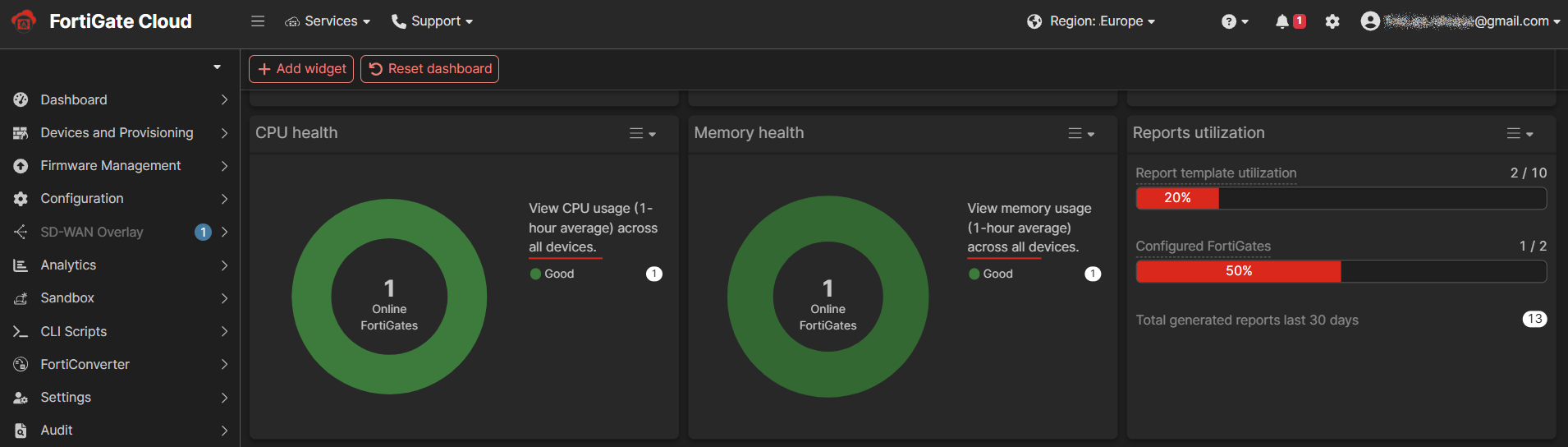
From the banner, you can access options including the following:

Option

Description

FortiGate quick selection menu Select a FortiGate from the dropdown list to access it. See Accessing a FortiGate.
Menu icon Use the menu icon to collapse or display the left pane, which displays other configuration options.
Services Access another Fortinet service.
Support Access Fortinet support options, such as contacting the Fortinet support team.
Region selection Select another region to access FortiGate Cloud in.

Demo resources

View use case videos and access FortiGate Cloud documentation for accounts created within the past 90 days.

Documentation link

Access FortiGate Cloud documentation.

Notifications

View and acknowledge notifications, such as for upcoming automatic FortiGate firmware upgrades.

Preferences

Configure dark or light theme, language to display FortiGate Cloud in, and other settings.

User menu dropdown

Displays the current logged in user. You can use the dropdown list to switch accounts or view account settings.

From the left pane, you can access other options including devices, Sandbox, analytics, and configuration features.

The following describes the portal options available from the left pane:

Option

Description

Dashboard

Dashboard displays a variety of widgets. The widgets provide information about the devices that your FortiGate Cloud is managing.

Devices and Provisioning

View a centralized inventory of all FortiGate and FortiWifi devices. See Devices and Provisioning.

Firmware management

View FortiGates provisioned to FortiGate Cloud and managed devices connected to FortiGates. Manage firmware upgrades and use firmware profiles. See Firmware management.

Configuration

Manage FortiGate Cloud account and Sandbox settings. See Configuration.

SD-WAN Overlay

Provision new SD-WAN overlay networks from FortiGate Cloud. See SD-WAN Overlay.

Analytics

Create and alter report configurations and their settings. These report configurations are available for all provisioned devices. See Analytics.

Sandbox

View the scan results from files that Sandbox submitted to FortiGuard for threat analysis. See Sandbox.

CLI Scripts

Configure and schedule scripts of CLI commands to run on your FortiGates. See CLI scripts.

FortiConverter

Create tickets to migrate a configuration from a third-party vendor or a FortiGate to a target FortiGate. See FortiConverter.

Settings

Configure general FortiGate Cloud settings, including users. View and activate FortiCloud subscriptions. See Settings.

Audit

View a log of actions that users have performed on FortiGate Cloud.

Related Videos

sidebar video

FortiGate Cloud Premium Introduction

  • 17,723 views
  • 3 years ago

Getting started with FortiGate Cloud

Getting started with FortiGate Cloud

Go to https://fortigate.forticloud.com to access FortiGate Cloud.

After you log in, the FortiGate Cloud portal displays the Dashboard > Status page. You can switch regions using the region selector and access FortiGate Cloud documentation from the ? icon.

The Dashboard > Status page displays a variety of widgets. The widgets provide information about the devices that your FortiGate Cloud manages, such as how many FortiGates have subscriptions. Dashboard > Security provides details on the FortiSandbox URL threat database version.

From the banner, you can access options including the following:

Option

Description

FortiGate quick selection menu Select a FortiGate from the dropdown list to access it. See Accessing a FortiGate.
Menu icon Use the menu icon to collapse or display the left pane, which displays other configuration options.
Services Access another Fortinet service.
Support Access Fortinet support options, such as contacting the Fortinet support team.
Region selection Select another region to access FortiGate Cloud in.

Demo resources

View use case videos and access FortiGate Cloud documentation for accounts created within the past 90 days.

Documentation link

Access FortiGate Cloud documentation.

Notifications

View and acknowledge notifications, such as for upcoming automatic FortiGate firmware upgrades.

Preferences

Configure dark or light theme, language to display FortiGate Cloud in, and other settings.

User menu dropdown

Displays the current logged in user. You can use the dropdown list to switch accounts or view account settings.

From the left pane, you can access other options including devices, Sandbox, analytics, and configuration features.

The following describes the portal options available from the left pane:

Option

Description

Dashboard

Dashboard displays a variety of widgets. The widgets provide information about the devices that your FortiGate Cloud is managing.

Devices and Provisioning

View a centralized inventory of all FortiGate and FortiWifi devices. See Devices and Provisioning.

Firmware management

View FortiGates provisioned to FortiGate Cloud and managed devices connected to FortiGates. Manage firmware upgrades and use firmware profiles. See Firmware management.

Configuration

Manage FortiGate Cloud account and Sandbox settings. See Configuration.

SD-WAN Overlay

Provision new SD-WAN overlay networks from FortiGate Cloud. See SD-WAN Overlay.

Analytics

Create and alter report configurations and their settings. These report configurations are available for all provisioned devices. See Analytics.

Sandbox

View the scan results from files that Sandbox submitted to FortiGuard for threat analysis. See Sandbox.

CLI Scripts

Configure and schedule scripts of CLI commands to run on your FortiGates. See CLI scripts.

FortiConverter

Create tickets to migrate a configuration from a third-party vendor or a FortiGate to a target FortiGate. See FortiConverter.

Settings

Configure general FortiGate Cloud settings, including users. View and activate FortiCloud subscriptions. See Settings.

Audit

View a log of actions that users have performed on FortiGate Cloud.