
Fortinet white logo
Fortinet white logo

Administration Guide

OU General settings

OU General settings

The OU Settings > General settings page lets you set anonymous cloud access for all accounts in the OU.
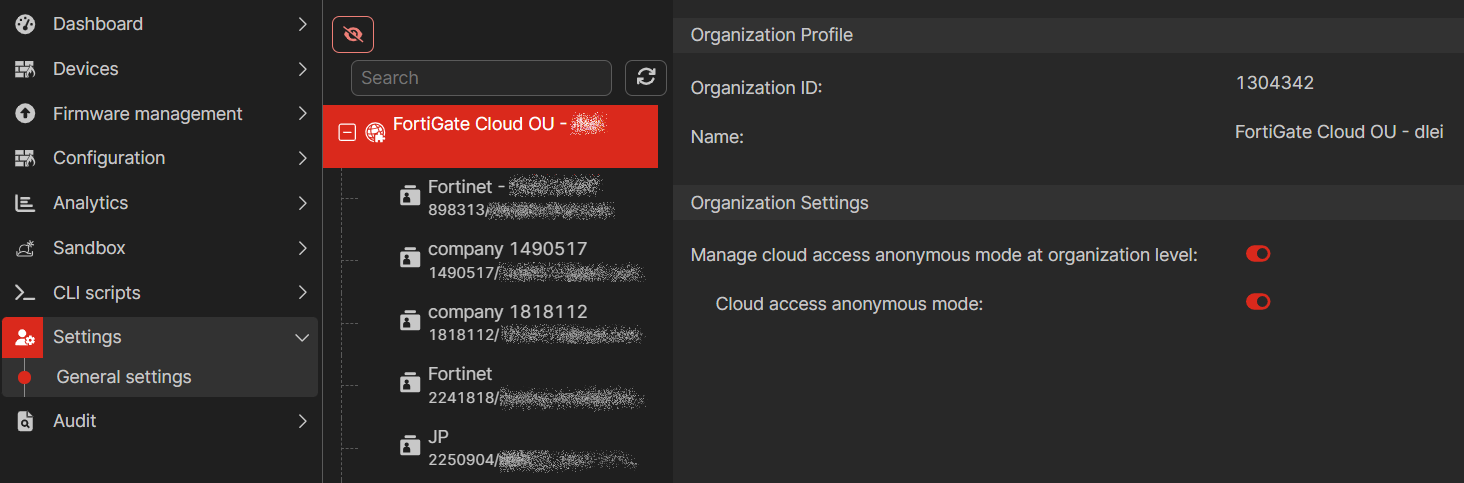
To set anonymous cloud access:
  1. Go to Settings > General Settings.

  2. Select the OU.

  3. Enable Manage cloud access anonymous mode at the organization level.

  4. Enable Cloud access anonymous mode.

    Anonymous cloud access is enabled for all accounts in the OU.

  5. Select an account to see Cloud Access Anonymous Mode is enabled and controlled by the organization administrator.

OU General settings

OU General settings

The OU Settings > General settings page lets you set anonymous cloud access for all accounts in the OU.

To set anonymous cloud access:
  1. Go to Settings > General Settings.

  2. Select the OU.

  3. Enable Manage cloud access anonymous mode at the organization level.

  4. Enable Cloud access anonymous mode.

    Anonymous cloud access is enabled for all accounts in the OU.

  5. Select an account to see Cloud Access Anonymous Mode is enabled and controlled by the organization administrator.