Fortinet white logo
Fortinet white logo

Administration Guide

Mitigation using Linux remote command

Mitigation using Linux remote command

1. Configure the endpoint

1.1 Verify the endpoint permissions

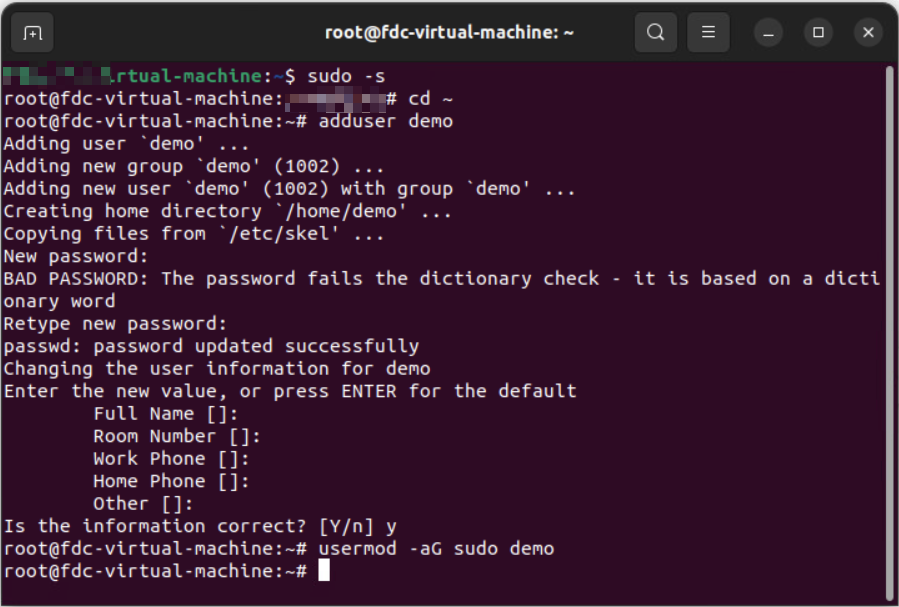
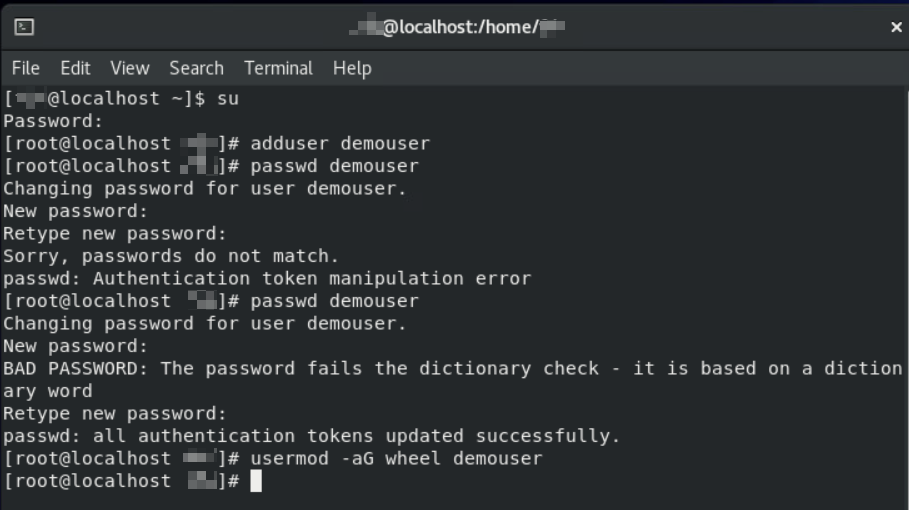
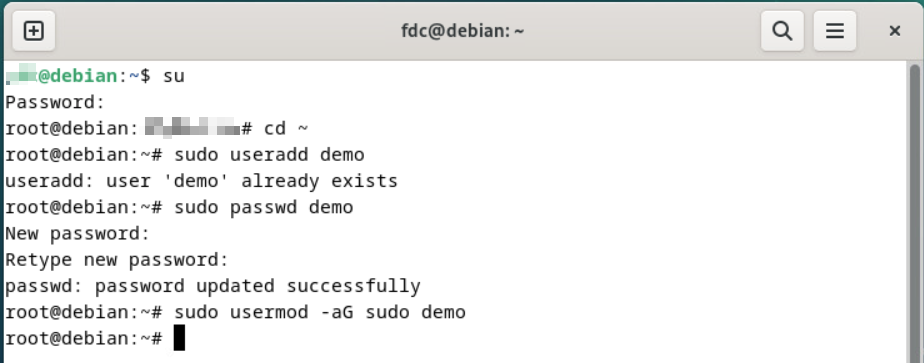
FortiDeceptor will use the user account with sudo permissions to access Linux endpoints. Please ensure the user account is included in the sudo group at the endpoint(s).

To create and add a user in the sudo group in the Linux endpoint terminal:

Ubuntu:
CentOS/RedHat:
Debian:
1.2 Allow the Linux SSH connection

By default, the SSH service may not be installed at the Linux endpoint, or the local firewall at the endpoint blocks the SSH traffic. To install the SSH service and open the port, run the following command:

sudo apt install openssh-server

sudo ufw allow ssh

1.3 Install nmcli at Linux endpoints

nmcli is the network management command-line tool required for Linux endpoint isolation.

To install the nmcli, run the following command:

Ubuntu/Debian (Debian-based distribution)

sudo apt update

sudo apt install network-manager

CentOS/RedHat (RPM-based distribution)

sudo yum check-update

sudo yum install NetworkManager

1.4 Allow nmcli command to run without password prompt

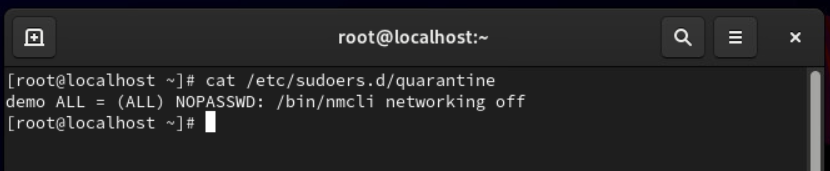
  1. Create a new file named quarantine under /etc/sudoers.d.
  2. Copy YOUR_USERNAME_HERE ALL = (ALL) NOPASSWD: /bin/nmcli networking off to the new file. Change YOUR_USERNAME_HERE to the real user name.

2. Configure FortiDeceptor

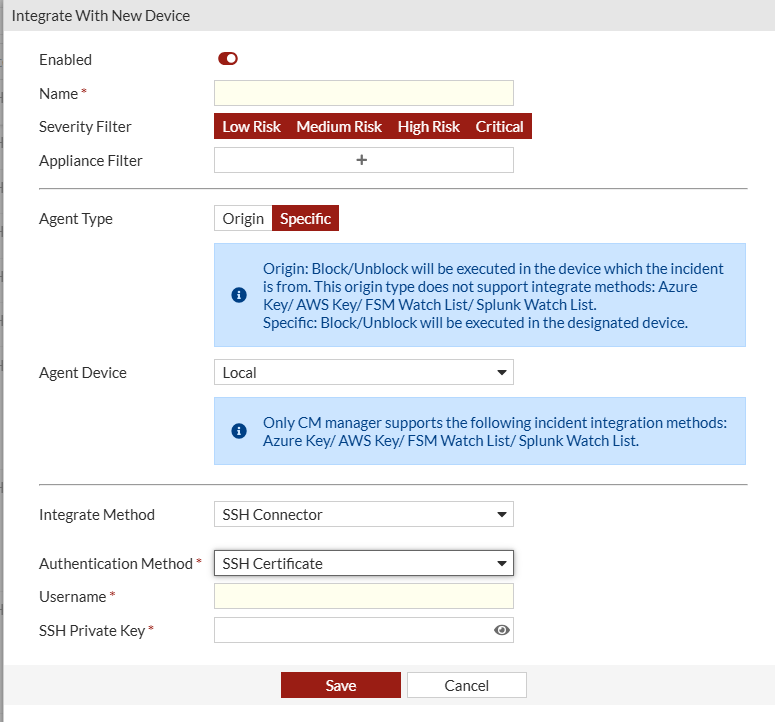
  1. In FortiDeceptor, go to Fabric > Quarantine Integration and click + Quarantine Integration with new device.
  2. Configure the integration settings ensuring the user has sufficient privileges to manage NICs.
  3. (Edge appliance only) Configure interface IP address for endpoint connection.

    Example:

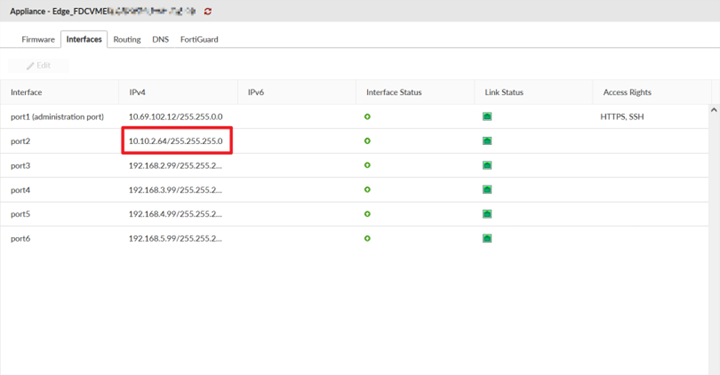
    If a decoy (IP: 10.10.2.12) is deployed in the deployment network (subnet 10.10.2.0/24) under the interface (port2), then the interface (port2) should be assigned an IP address in the same subnet as below. Thereby, the isolation command can be sent to the endpoints from the corresponding interface.
    Note

    For Edge appliances:

    You are required to go to Network > Interfaces and configure the relevant interface to where the endpoint is accessible. FortiDeceptor v6.0.0 does not support a Trunk port for Windows Network Isolation, IR collector and SSH connector.

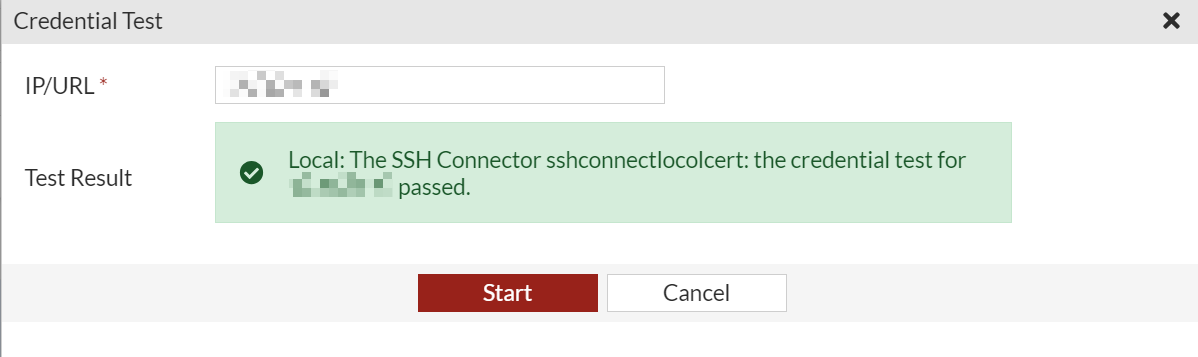
  4. (Optional) Click Credentials Test and then click Start to test the connection.
3. (Optional) Share SSH public key to the endpoint

This step is required for the SSH connector configured with a SSH certificate as authentication method.

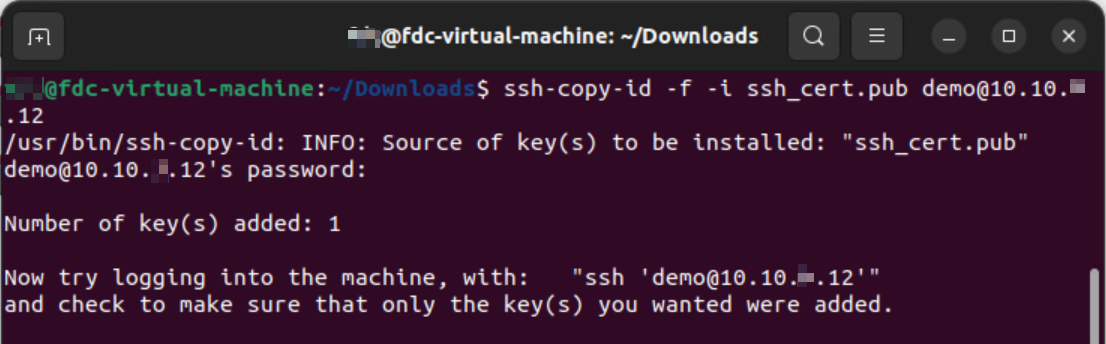
  1. In FortiDeceptor , go to Fabric > Quarantine Integration, and download the generated SSH public key.
  2. Apply the downloaded generated SSH public key to the corresponding user at the endpoints.
Mitigation using Linux remote command

Mitigation using Linux remote command

1. Configure the endpoint

1.1 Verify the endpoint permissions

FortiDeceptor will use the user account with sudo permissions to access Linux endpoints. Please ensure the user account is included in the sudo group at the endpoint(s).

To create and add a user in the sudo group in the Linux endpoint terminal:

Ubuntu:

CentOS/RedHat:

Debian:

1.2 Allow the Linux SSH connection

By default, the SSH service may not be installed at the Linux endpoint, or the local firewall at the endpoint blocks the SSH traffic. To install the SSH service and open the port, run the following command:

sudo apt install openssh-server

sudo ufw allow ssh

1.3 Install nmcli at Linux endpoints

nmcli is the network management command-line tool required for Linux endpoint isolation.

To install the nmcli, run the following command:

Ubuntu/Debian (Debian-based distribution)

sudo apt update

sudo apt install network-manager

CentOS/RedHat (RPM-based distribution)

sudo yum check-update

sudo yum install NetworkManager

1.4 Allow nmcli command to run without password prompt

  1. Create a new file named quarantine under /etc/sudoers.d.
  2. Copy YOUR_USERNAME_HERE ALL = (ALL) NOPASSWD: /bin/nmcli networking off to the new file. Change YOUR_USERNAME_HERE to the real user name.

2. Configure FortiDeceptor

  1. In FortiDeceptor, go to Fabric > Quarantine Integration and click + Quarantine Integration with new device.
  2. Configure the integration settings ensuring the user has sufficient privileges to manage NICs.

  3. (Edge appliance only) Configure interface IP address for endpoint connection.

    Example:

    If a decoy (IP: 10.10.2.12) is deployed in the deployment network (subnet 10.10.2.0/24) under the interface (port2), then the interface (port2) should be assigned an IP address in the same subnet as below. Thereby, the isolation command can be sent to the endpoints from the corresponding interface.

    Note

    For Edge appliances:

    You are required to go to Network > Interfaces and configure the relevant interface to where the endpoint is accessible. FortiDeceptor v6.0.0 does not support a Trunk port for Windows Network Isolation, IR collector and SSH connector.

  4. (Optional) Click Credentials Test and then click Start to test the connection.

3. (Optional) Share SSH public key to the endpoint

This step is required for the SSH connector configured with a SSH certificate as authentication method.

  1. In FortiDeceptor , go to Fabric > Quarantine Integration, and download the generated SSH public key.
  2. Apply the downloaded generated SSH public key to the corresponding user at the endpoints.