
Fortinet white logo
Fortinet white logo

Release Notes

June 2026 Platform Releases

June 2026 Platform Releases

Generally Available

  • Alert Dashboard: View alerts by severity, category, or sub-category

    The Alert summary bar chart has been updated with a new grouping toggle, giving you more ways to analyze your alert activity.
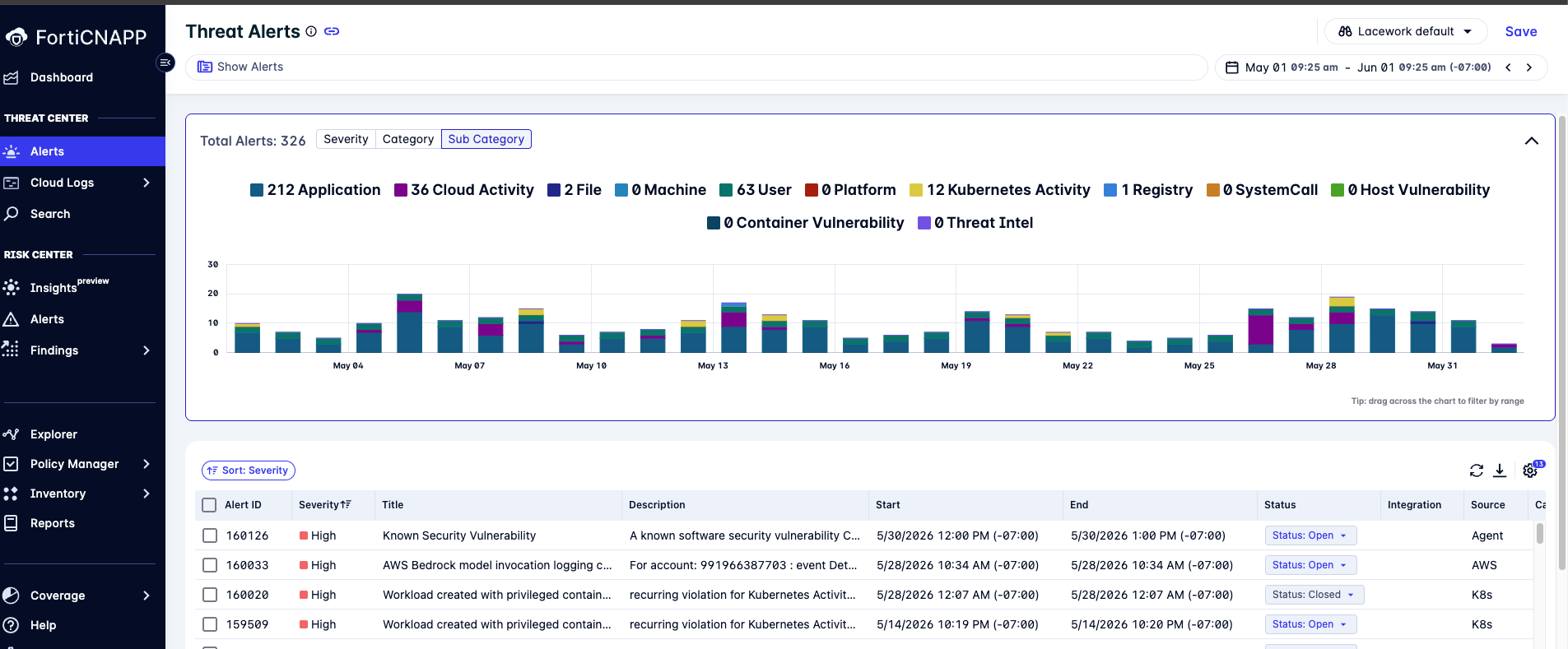
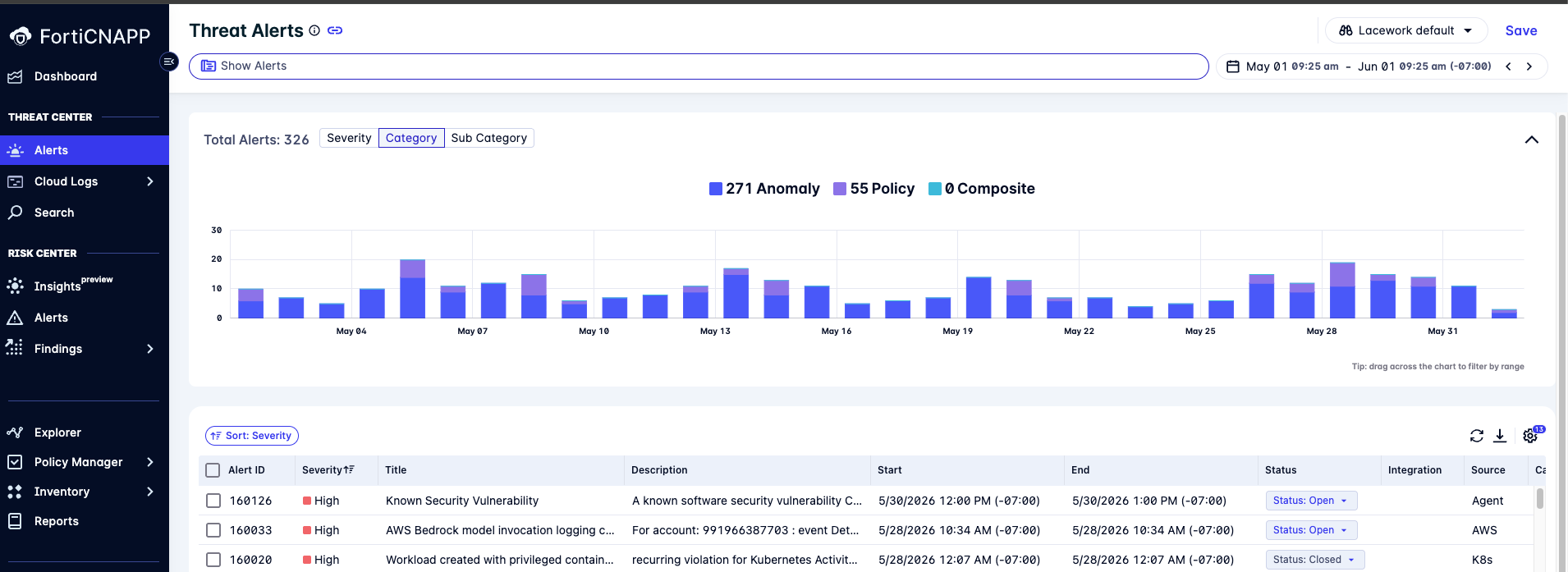
    Where it appears:

    • Alerts

    • Threat Alerts tab in AWS CloudTrail, Azure Activity Log, and GCP Audit Log

    Available groupings:

    • Severity: Critical, High, Medium, Low, Info

    • Category: Anomaly, Policy, Composite

    • Sub-Category: Application, Cloud Activity, File, Machine, User, Platform, Kubernetes Activity, Registry, SystemCall, Host Vulnerability, Container Vulnerability, Threat Intel

    Select a grouping and the chart and legend update immediately. The toggle is automatically disabled when no alerts are present in the selected time range.

    Note: The Compliance sub-category is not shown on Threat Alerts views (AWS CloudTrail, Azure Activity Log, GCP Audit Log). Risk Alerts is not affected by this change and continues to display the severity-only view.

  • FortiGuard IoC feed integration

    FortiGuard is now integrated as a threat intelligence source in FortiCNAPP. FortiGuard indicators are ingested into the threat intelligence database and used to enrich detections across FortiCNAPP.

    This expands detection coverage by leveraging Fortinet’s extensive threat intelligence, improving identification of known malicious IPs, domains, and files. All detection engines that rely on IoC matching benefit from enriched context provided by FortiGuard Labs, strengthening overall detection accuracy and effectiveness.

    • Alerts include a FortiGuard tag when matched indicators originate from FortiGuard intelligence.

    • IP address detail pages include a FortiGuard link that provides direct access to IoC details in FortiGuard Labs.

    • File reputation is enhanced with FortiGuard data, and file hash detail pages include a FortiGuard link for additional context on malicious files.

  • Consolidated Subscription page

    The Subscriptions, Usage, and License settings pages have been consolidated into the new Settings > Usage > Subscription page. The Subscription page includes information on your subscription and vCPU usage. Usage information for the entire account or Organization can be reviewed in a customized time frame. Furthermore, review usage information per Cloud account or per Organization sub-account. See Subscription.

  • Vulnerability Scanner 0.29.0 released

    Vulnerability Scanner version 0.29.0 is now available. This release includes the following:

    • Improvements to Golang scanning support.

    • Fix for a bug with detecting feature deletion in OverlayFS and opaque-dir whiteouts across layers.

    • Miscellaneous fixes.

    Availability

    For more information about using the inline scanner, see Integrate Inline Scanner in the FortiCNAPP Administration Guide.

  • Explorer: Natural language search and redesigned Saved Queries panel

    Explorer has been updated with a new natural language search experience and a redesigned Saved Queries panel.

    Natural language search

    The new search bar in Explorer lets you describe investigations in plain language instead of building queries filter by filter. Enter phrases such as "aws critical vulns” or “exposed mongodb” to generate relevant query suggestions. The system automatically interprets keywords as filter values, including cloud providers (AWS, Azure, GCP), vulnerability severity, resource types (such as S3 Bucket or Key Vault), services and ports (SSH, RDP, MongoDB, Redis), and network ranges. Each suggestion includes a preview of the applied filters, with inferred values highlighted.

    Suggestions are powered by four commonly used investigation templates:

    • Vulnerabilities by Cloud and Severity.

    • Hosts affected by a specific CVE.

    • Storage assets with compliance violations accessible by identities.

    • High-risk hosts with open ports exposed to CIDR.

    Pasted identifiers such as CVE IDs, IPv4 addresses, CIDR ranges, AWS IAM ARNs, or port numbers are automatically detected and offered as a one-click lookup. The search bar also returns matching saved queries, including FortiCNAPP-provided queries, so you can quickly locate and run investigations.

    Redesigned Saved Queries panel

    The saved queries dropdown has been replaced with a collapsible Saved Queries panel above the results table. In this panel, you can:

    • Search saved queries by name or description.

    • Sort and filter by name or creator, with FortiCNAPP-provided queries clearly identified.

    The panel is collapsed by default, and when collapsed, its header displays the currently selected query.

  • Cloud activity log pages unified view

    Cloud Activity Investigation is now consolidated into a single, unified page that brings together AWS CloudTrail, Azure Activity Log, and GCP Audit Logs for a streamlined investigation experience.

    • Single entry point: A new unified URL (/investigation/cloudActivity) replaces the separate pages for each cloud provider.

    • Inline provider switching: Easily toggle between AWS, Azure, and GCP using buttons in the page header—no navigation required.

    • Context-aware sharing: URLs now include a ?provider=aws|azure|gcp parameter, ensuring shared links open directly to the correct cloud provider view.

    This update simplifies navigation, improves efficiency during investigations, and ensures consistent context when collaborating.

  • Unified CI/CD integration documentation for GitHub - IaC and SCA

    The Code Security CI/CD integration documentation for GitHub has been unified, consolidating the previously separate IaC and SCA scanning documentation into a single streamlined integration experience. See GitHub.

  • Advanced configuration settings for Code Security

    Advanced configuration capabilities have been implemented in the UI and through the use of a codesec.yaml source file. Code Security settings control which security features are enabled for your repositories, including scanning options and pull request (PR) actions. These settings can be configured at multiple levels: globally, per codespace, or per repository. The codesec.yaml file defines a repository's custom scanning profile and overrides any settings configured in the UI at the repository, codespace, or global level. See Code Security settings. See Code Security settings.

  • Code security lock file generation

    Package manager lock files are required when performing SCA scanning in order to detect complete sets of dependencies within a repository. If lock files are not available in your repository, FortiCNAPP will generate lock files using the SCA CLI and available tool chains. See Vulnerabilities: 3rd party.

  • AI-generated Incident Report & Remediation tabs in alert details (composite alerts)

    Composite alert detail pages in FortiCNAPP now include two AI-generated tabs: Incident Report and Remediation.

    The Incident Report tab summarizes what happened and surfaces prioritized findings. The Remediation tab provides AI-generated remediation and mitigation guidance. You can ask follow-up questions through the integrated AI Assistant for deeper investigation.

    What’s new

    • Content is generated on first open and streams progressively. Later visits load instantly from cache and regenerate automatically when the underlying alert data changes.

    • Built-in actions to copy, export to Markdown, and expand or collapse sections, plus an Ask AI Assistant entry point for follow-up investigation.

    This feature is only available if you have enabled FortiCNAPP AI Assist in Settings. See FortiCNAPP AI Assist.

  • Low latency EKS audit log violation policy evaluation and alerts

    Amazon EKS audit log (Kubernetes activity) violation policies are now evaluated using a low‑latency processing pipeline.

    With this update, EKS audit log violation policies are evaluated in near real time, enabling faster detection and alerting for potential threats. EKS and GKE alerts now utilize the same low-latency pipeline cadence, but are generated independently for per‑cloud visibility.

    • Detect and investigate EKS audit log violations sooner with significantly reduced evaluation latency.

    • Streamline cross‑cloud triage with consistent alert timing across EKS and GKE.

  • Lacework ServiceNow integrations updated in the ServiceNow Store

    Three ServiceNow integration apps for Infrastructure Vulnerability Response, Container Vulnerability Response, and Configuration Compliance have been updated in the ServiceNow Store. These apps have been re-certified and republished, addressing prior deprecation and ensuring compliance with current store requirements.

    All three apps are now available for installation and support the Yokohama, Zurich, and Australia ServiceNow platforms.

Public Preview

  • Code Security LLM Skills Scanner

    Agentic skills SAST scanning for markdown is supported by Code Security. For skill.md files related to agentic code, the SAST scanners can detect for recognized CWEs and OWASP Agentic Skills (AST). For a list of supported CWEs and ASTs, see Markdown.

June 2026 Platform Releases

June 2026 Platform Releases

Generally Available

  • Alert Dashboard: View alerts by severity, category, or sub-category

    The Alert summary bar chart has been updated with a new grouping toggle, giving you more ways to analyze your alert activity.

    Where it appears:

    • Alerts

    • Threat Alerts tab in AWS CloudTrail, Azure Activity Log, and GCP Audit Log

    Available groupings:

    • Severity: Critical, High, Medium, Low, Info

    • Category: Anomaly, Policy, Composite

    • Sub-Category: Application, Cloud Activity, File, Machine, User, Platform, Kubernetes Activity, Registry, SystemCall, Host Vulnerability, Container Vulnerability, Threat Intel

    Select a grouping and the chart and legend update immediately. The toggle is automatically disabled when no alerts are present in the selected time range.

    Note: The Compliance sub-category is not shown on Threat Alerts views (AWS CloudTrail, Azure Activity Log, GCP Audit Log). Risk Alerts is not affected by this change and continues to display the severity-only view.

  • FortiGuard IoC feed integration

    FortiGuard is now integrated as a threat intelligence source in FortiCNAPP. FortiGuard indicators are ingested into the threat intelligence database and used to enrich detections across FortiCNAPP.

    This expands detection coverage by leveraging Fortinet’s extensive threat intelligence, improving identification of known malicious IPs, domains, and files. All detection engines that rely on IoC matching benefit from enriched context provided by FortiGuard Labs, strengthening overall detection accuracy and effectiveness.

    • Alerts include a FortiGuard tag when matched indicators originate from FortiGuard intelligence.

    • IP address detail pages include a FortiGuard link that provides direct access to IoC details in FortiGuard Labs.

    • File reputation is enhanced with FortiGuard data, and file hash detail pages include a FortiGuard link for additional context on malicious files.

  • Consolidated Subscription page

    The Subscriptions, Usage, and License settings pages have been consolidated into the new Settings > Usage > Subscription page. The Subscription page includes information on your subscription and vCPU usage. Usage information for the entire account or Organization can be reviewed in a customized time frame. Furthermore, review usage information per Cloud account or per Organization sub-account. See Subscription.

  • Vulnerability Scanner 0.29.0 released

    Vulnerability Scanner version 0.29.0 is now available. This release includes the following:

    • Improvements to Golang scanning support.

    • Fix for a bug with detecting feature deletion in OverlayFS and opaque-dir whiteouts across layers.

    • Miscellaneous fixes.

    Availability

    For more information about using the inline scanner, see Integrate Inline Scanner in the FortiCNAPP Administration Guide.

  • Explorer: Natural language search and redesigned Saved Queries panel

    Explorer has been updated with a new natural language search experience and a redesigned Saved Queries panel.

    Natural language search

    The new search bar in Explorer lets you describe investigations in plain language instead of building queries filter by filter. Enter phrases such as "aws critical vulns” or “exposed mongodb” to generate relevant query suggestions. The system automatically interprets keywords as filter values, including cloud providers (AWS, Azure, GCP), vulnerability severity, resource types (such as S3 Bucket or Key Vault), services and ports (SSH, RDP, MongoDB, Redis), and network ranges. Each suggestion includes a preview of the applied filters, with inferred values highlighted.

    Suggestions are powered by four commonly used investigation templates:

    • Vulnerabilities by Cloud and Severity.

    • Hosts affected by a specific CVE.

    • Storage assets with compliance violations accessible by identities.

    • High-risk hosts with open ports exposed to CIDR.

    Pasted identifiers such as CVE IDs, IPv4 addresses, CIDR ranges, AWS IAM ARNs, or port numbers are automatically detected and offered as a one-click lookup. The search bar also returns matching saved queries, including FortiCNAPP-provided queries, so you can quickly locate and run investigations.

    Redesigned Saved Queries panel

    The saved queries dropdown has been replaced with a collapsible Saved Queries panel above the results table. In this panel, you can:

    • Search saved queries by name or description.

    • Sort and filter by name or creator, with FortiCNAPP-provided queries clearly identified.

    The panel is collapsed by default, and when collapsed, its header displays the currently selected query.

  • Cloud activity log pages unified view

    Cloud Activity Investigation is now consolidated into a single, unified page that brings together AWS CloudTrail, Azure Activity Log, and GCP Audit Logs for a streamlined investigation experience.

    • Single entry point: A new unified URL (/investigation/cloudActivity) replaces the separate pages for each cloud provider.

    • Inline provider switching: Easily toggle between AWS, Azure, and GCP using buttons in the page header—no navigation required.

    • Context-aware sharing: URLs now include a ?provider=aws|azure|gcp parameter, ensuring shared links open directly to the correct cloud provider view.

    This update simplifies navigation, improves efficiency during investigations, and ensures consistent context when collaborating.

  • Unified CI/CD integration documentation for GitHub - IaC and SCA

    The Code Security CI/CD integration documentation for GitHub has been unified, consolidating the previously separate IaC and SCA scanning documentation into a single streamlined integration experience. See GitHub.

  • Advanced configuration settings for Code Security

    Advanced configuration capabilities have been implemented in the UI and through the use of a codesec.yaml source file. Code Security settings control which security features are enabled for your repositories, including scanning options and pull request (PR) actions. These settings can be configured at multiple levels: globally, per codespace, or per repository. The codesec.yaml file defines a repository's custom scanning profile and overrides any settings configured in the UI at the repository, codespace, or global level. See Code Security settings. See Code Security settings.

  • Code security lock file generation

    Package manager lock files are required when performing SCA scanning in order to detect complete sets of dependencies within a repository. If lock files are not available in your repository, FortiCNAPP will generate lock files using the SCA CLI and available tool chains. See Vulnerabilities: 3rd party.

  • AI-generated Incident Report & Remediation tabs in alert details (composite alerts)

    Composite alert detail pages in FortiCNAPP now include two AI-generated tabs: Incident Report and Remediation.

    The Incident Report tab summarizes what happened and surfaces prioritized findings. The Remediation tab provides AI-generated remediation and mitigation guidance. You can ask follow-up questions through the integrated AI Assistant for deeper investigation.

    What’s new

    • Content is generated on first open and streams progressively. Later visits load instantly from cache and regenerate automatically when the underlying alert data changes.

    • Built-in actions to copy, export to Markdown, and expand or collapse sections, plus an Ask AI Assistant entry point for follow-up investigation.

    This feature is only available if you have enabled FortiCNAPP AI Assist in Settings. See FortiCNAPP AI Assist.

  • Low latency EKS audit log violation policy evaluation and alerts

    Amazon EKS audit log (Kubernetes activity) violation policies are now evaluated using a low‑latency processing pipeline.

    With this update, EKS audit log violation policies are evaluated in near real time, enabling faster detection and alerting for potential threats. EKS and GKE alerts now utilize the same low-latency pipeline cadence, but are generated independently for per‑cloud visibility.

    • Detect and investigate EKS audit log violations sooner with significantly reduced evaluation latency.

    • Streamline cross‑cloud triage with consistent alert timing across EKS and GKE.

  • Lacework ServiceNow integrations updated in the ServiceNow Store

    Three ServiceNow integration apps for Infrastructure Vulnerability Response, Container Vulnerability Response, and Configuration Compliance have been updated in the ServiceNow Store. These apps have been re-certified and republished, addressing prior deprecation and ensuring compliance with current store requirements.

    All three apps are now available for installation and support the Yokohama, Zurich, and Australia ServiceNow platforms.

Public Preview

  • Code Security LLM Skills Scanner

    Agentic skills SAST scanning for markdown is supported by Code Security. For skill.md files related to agentic code, the SAST scanners can detect for recognized CWEs and OWASP Agentic Skills (AST). For a list of supported CWEs and ASTs, see Markdown.