
Fortinet white logo
Fortinet white logo

User Guide

Integration (deployment mode)

Integration (deployment mode)

This section answers frequently asked questions about the ABP integration (deployment mode).

What are the deployment options for Advanced Bot Protection?

FortiAppSec Cloud requires injecting JavaScript into the client’s session to collect data. Two options are available:

A. Standalone Deployment (coming soon): You can deploy Advanced Bot Protection as a standalone solution. In this mode, you will need to install a snipped code on the web application for browser JS insertion. This mode operates only in monitoring (visibility) mode and cannot enforce or block bots.

B. Integrated Deployment with FortiADC and FortiWeb: Alternatively, you can integrate Advanced Bot Protection with FortiADC and FortiWeb, two leading products in the Fortinet ecosystem. This integrated solution enhances your overall security posture by combining the advanced bot protection capabilities of Advanced Bot Protection with the robust application delivery and web application firewall capabilities of FortiADC and FortiWeb.

How does the integration work?
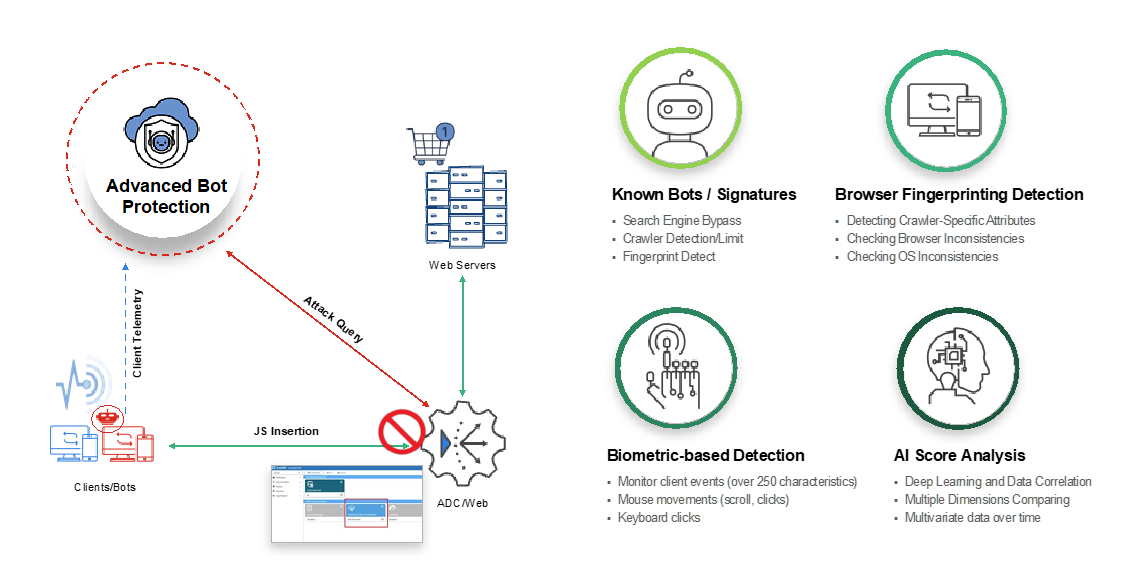
  1. The client reaches the web application via the FortiADC/FortiWeb (acting as a Reverse Proxy).
  2. FortiADC/FortiWeb returns an HTTP/S response to the client with JavaScript insertion (via ) for telemetric information.
  3. The client and the FortiADC/FortiWeb (via fabric connector) communicate with the Advanced Bot Protection Cloud for data telemetry info (headers, device fingerprinting, and more).
  4. Advanced Bot Protection inspects the request to determine if the client – is human or a bot.
  5. Based on the result of the analysis, Advanced Bot Protection analyzes the request and sends an instruction back to FortiADC/FortiWeb (block, CAPTCHA, allow).
Does Advanced Bot Protection charge for blocked attacks?

No. The FortiAppSec Cloud provides attack information to the FortiADC and FortiWeb, which blocks access to the application and stops the threats.

Integration (deployment mode)

Integration (deployment mode)

This section answers frequently asked questions about the ABP integration (deployment mode).

What are the deployment options for Advanced Bot Protection?

FortiAppSec Cloud requires injecting JavaScript into the client’s session to collect data. Two options are available:

A. Standalone Deployment (coming soon): You can deploy Advanced Bot Protection as a standalone solution. In this mode, you will need to install a snipped code on the web application for browser JS insertion. This mode operates only in monitoring (visibility) mode and cannot enforce or block bots.

B. Integrated Deployment with FortiADC and FortiWeb: Alternatively, you can integrate Advanced Bot Protection with FortiADC and FortiWeb, two leading products in the Fortinet ecosystem. This integrated solution enhances your overall security posture by combining the advanced bot protection capabilities of Advanced Bot Protection with the robust application delivery and web application firewall capabilities of FortiADC and FortiWeb.

How does the integration work?
  1. The client reaches the web application via the FortiADC/FortiWeb (acting as a Reverse Proxy).
  2. FortiADC/FortiWeb returns an HTTP/S response to the client with JavaScript insertion (via ) for telemetric information.
  3. The client and the FortiADC/FortiWeb (via fabric connector) communicate with the Advanced Bot Protection Cloud for data telemetry info (headers, device fingerprinting, and more).
  4. Advanced Bot Protection inspects the request to determine if the client – is human or a bot.
  5. Based on the result of the analysis, Advanced Bot Protection analyzes the request and sends an instruction back to FortiADC/FortiWeb (block, CAPTCHA, allow).

Does Advanced Bot Protection charge for blocked attacks?

No. The FortiAppSec Cloud provides attack information to the FortiADC and FortiWeb, which blocks access to the application and stops the threats.