

Configuring SNMP v3
To configure SNMP v3:
- Go to System > SNMP.
- Click the SNMPv3 tab.
- Click Create New to display the configuration editor.
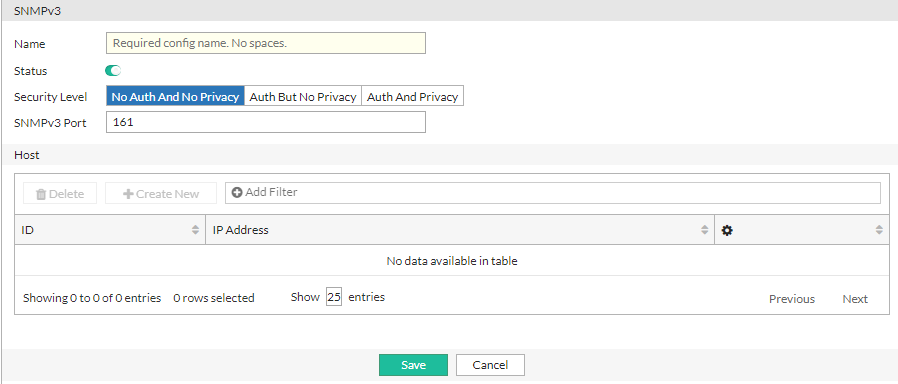
- Configure the following SNMP v3 settings:
Settings Guidelines Name User name that the SNMP Manager uses to communicate with the SNMP Agent. After you initially save the configuration, you cannot edit the name. Status Enable/disable the configuration. Security Level - No Auth And No Privacy—Do not require authentication or encryption.
- Auth But No Privacy—Authentication based on MD5 or SHA algorithms. Select an algorithm and specify a password.
- Auth And Privacy—Authentication based on MD5 or SHA algorithms, and encryption based on AES or DES algorithms. Select an Auth Algorithm and specify an Auth Password; and select a Private Algorithm and specify a Private Password.
Auth Algorithm
The Auth Algorithm option is available if the Security Level is Auth But No Privacy or Auth And Privacy.
Select an Authentication Algorithm from the following options:
SHA1
MD5
SHA224
SHA256
SHA384
SHA512
Auth Password
The Auth Password option is available if the Security Level is Auth But No Privacy or Auth And Privacy.
Specify an Authentication Password.
Private Algorithm
The Private Algorithm option is available if the Security Level is Auth And Privacy.
Select a Private Algorithm from the following options:
AES
DES
AES256
AES256CISCO
Private Password
The Private Password option is available if the Security Level is Auth And Privacy.
Specify a Private Password.
SNMP v3 Port Enter the port number on which the system listens for SNMP v3 queries from the SNMP managers. The default is 161. Host IP Address
Enter the subnet address for the SNMP manager to be permitted to query the FortiADC system. SNMP managers have read-only access. You can add up to 8 SNMP managers to each community. To allow any IP address using this SNMP community name to query the FortiADC system, enter
0.0.0.0/0. For security best practice reasons, however, this is not recommended. - Click Save.
After the SNMP v3 configuration is saved, the Host section becomes available to configure. - Under the Host section, click Create New to display the configuration editor.
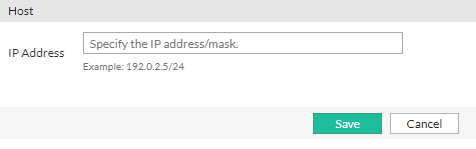
- Configure the following Host settings:
Settings Guidelines IP Address
Enter the subnet address for the SNMP manager to be permitted to query the FortiADC system. SNMP managers have read-only access. You can add up to 8 SNMP managers to each community. To allow any IP address using this SNMP community name to query the FortiADC system, enter
0.0.0.0/0. For security best practice reasons, however, this is not recommended. - Save the Host list configuration and then save the SNMP v3 configuration to commit the Host list changes.

|
Test both traps and queries (assuming you have enabled both). Traps and queries typically occur on different port numbers, and therefore verifying one does not necessarily verify that the other is also functional. To test queries, from your SNMP manager, query the FortiADC appliance. To test traps, cause one of the events that should trigger a trap. |