
Fortinet white logo
Fortinet white logo

Creating Cloud service entitlements

Creating Cloud service entitlements

Create a Cloud service entitlement to be used with various products, including FortiWeb Cloud or FortiSASE. License tokens are not applicable for Cloud services.

You cannot add purchased Cloud services or pre-existing Trial or Evaluation services to FortiFlex. You must create a new Cloud service entitlement.

To create a Cloud service entitlement:
  1. Go to Flex Entitlements, and click New Flex Entitlement. The Add Flex Entitlement(s) page opens.
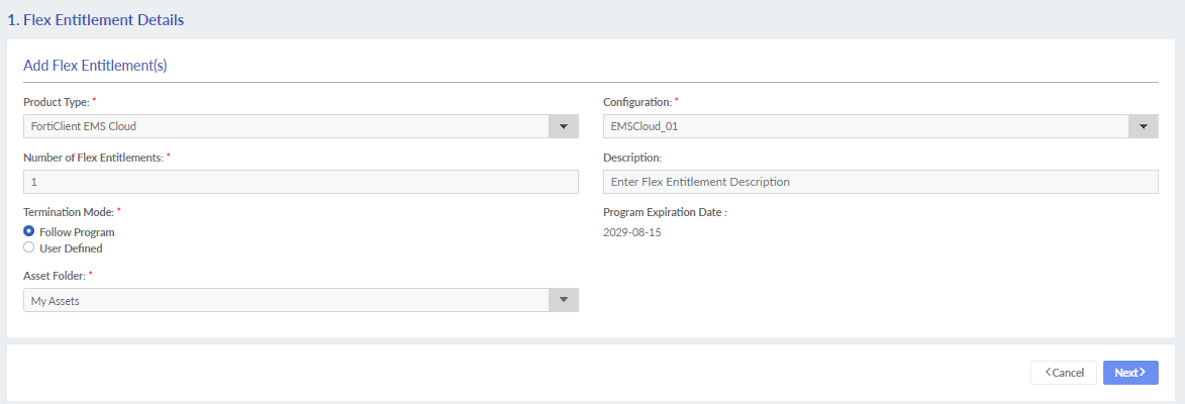
  2. Configure the Cloud entitlement.

    Product Type

    Select one of the following service bundles from the dropdown:

    • FortiWeb Cloud

    • FortiClient EMS Cloud

    • FortiSASE

    • FortiEDR MSSP

    • FortiRecon

    • FortiSIEM Cloud

    • FortiNDR

    • FortiAppSec

    • FortiDLP

    • FortiManager Cloud

    For information about the product types, see Service offerings.

    ConfigurationSelect a configuration from the list. See Creating a Cloud service configuration.
    Number of Flex EntitlementsEnter the number of entitlements. See Creating a Cloud service configuration.
    DescriptionEnter a description.
    Termination Mode
    • Select Follow Program to terminate the machine when the program expires.
    • Select User Defined, and select a date in the calendar to specify the termination date.
    Asset Folder

    Assign the service to a folder in My Assets.

    For more information about Asset Folders, see Asset Management > Creating custom views.

    You can use an asset folder to request the next available serial number with the API. See Creating a license pool group.

  3. Click Next.
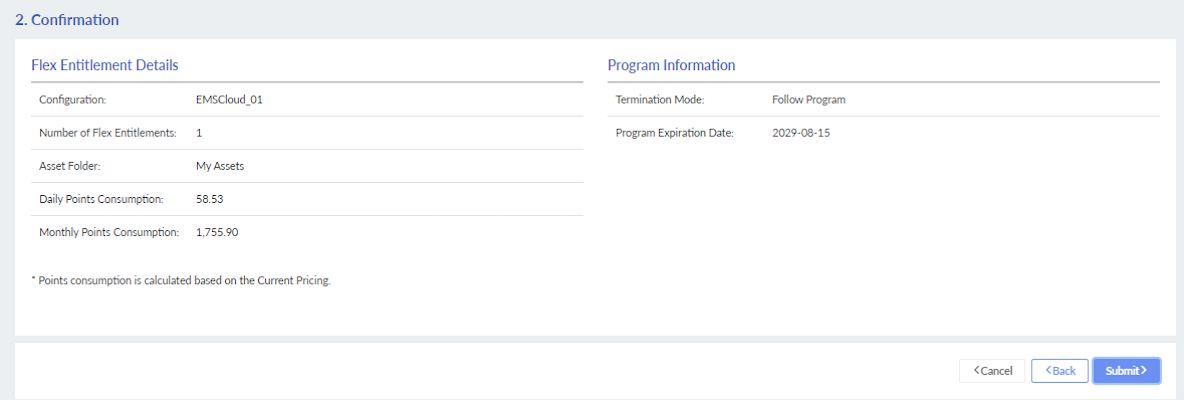
  4. Review the Flex Entitlement Details and Program Information, and click Submit.
Creating Cloud service entitlements

Creating Cloud service entitlements

Create a Cloud service entitlement to be used with various products, including FortiWeb Cloud or FortiSASE. License tokens are not applicable for Cloud services.

You cannot add purchased Cloud services or pre-existing Trial or Evaluation services to FortiFlex. You must create a new Cloud service entitlement.

To create a Cloud service entitlement:
  1. Go to Flex Entitlements, and click New Flex Entitlement. The Add Flex Entitlement(s) page opens.

  2. Configure the Cloud entitlement.

    Product Type

    Select one of the following service bundles from the dropdown:

    • FortiWeb Cloud

    • FortiClient EMS Cloud

    • FortiSASE

    • FortiEDR MSSP

    • FortiRecon

    • FortiSIEM Cloud

    • FortiNDR

    • FortiAppSec

    • FortiDLP

    • FortiManager Cloud

    For information about the product types, see Service offerings.

    ConfigurationSelect a configuration from the list. See Creating a Cloud service configuration.
    Number of Flex EntitlementsEnter the number of entitlements. See Creating a Cloud service configuration.
    DescriptionEnter a description.
    Termination Mode
    • Select Follow Program to terminate the machine when the program expires.
    • Select User Defined, and select a date in the calendar to specify the termination date.
    Asset Folder

    Assign the service to a folder in My Assets.

    For more information about Asset Folders, see Asset Management > Creating custom views.

    You can use an asset folder to request the next available serial number with the API. See Creating a license pool group.

  3. Click Next.
  4. Review the Flex Entitlement Details and Program Information, and click Submit.