

server-policy health
Use this command to configure server health checks.
Tests for server responsiveness (called “server health checks” in the web UI) poll web servers that are members of a server pool to determine their availability before forwarding traffic. Server health checks can use TCP, HTTP/HTTPS, ICMP ECHO_REQUEST (ping), TCP SSL, or TCP half-open.
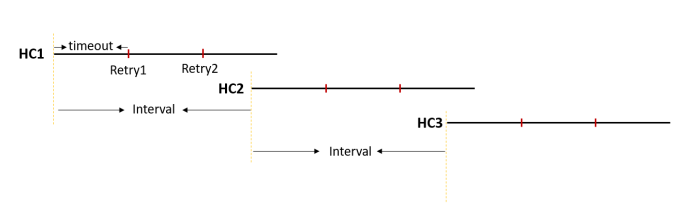
The FortiWeb appliance polls the server at the frequency set in the timeout <seconds_int> option. If the appliance does not receive a reply within the timeout period, and you have configured the health check to retry, it attempts a health check again; otherwise, the server is deemed unresponsive. The FortiWeb appliance reacts to unresponsive servers by disabling traffic to that server until it becomes responsive.

|
If a back-end server will be unavailable for a long period, such as when a server is undergoing hardware repair, it is experiencing extended downtime, or when you have removed a server from the server pool, you can improve the performance of your FortiWeb appliance by disabling the back-end server, rather than allowing the server health check to continue to check for responsiveness. For details, see server-policy server-pool. |
To apply server health checks, select them in a server pool configuration. For details, see server-policy server-pool.
To use this command, your administrator account’s access control profile requires either w or rw permission to the traroutegrp area. For details, see Permissions.
Syntax
config server-policy health
set trigger-policy "<trigger-policy_name>"
set group-id <int>
set role {master | slave | standalone}
configure health-list
edit <entry_index>
set type {icmp | tcp | HTTP | tcp-ssl | tcp-half-open}
set method {get | head | post}
set match-type {response-code | match-content | all}
set response-code {response-code_int}
set match-content "<match-content_str>"
next
end
| Variable | Description | Default |
|
Enter the name of the server health check. The maximum length is 63 characters. To display the list of existing server health checks, enter:
|
No default. | |
|
Enter the name of the trigger to apply when the health check detects a failed server (see log trigger-policy). The maximum length is 63 characters. To display the list of existing trigger policies, enter:
|
No default. | |
|
and
|
|
|
FortiWeb performs health check on the server pool which has referenced a "master" health check, then synchronize the result to all the server pools which have referenced the "slave" health check of the same group-id. This can avoid unnecessary health checks in certain cases such as when different server pools sharing the same IP address. This option is not available if the role is standalone. |
No default. |
|
|
If you want the health check result to be shared across multiple server pools, then specify whether this health check is a master or a slave. This is used together with the above command If the health check result is not to be shared, then choose |
standalone |
|
| Enter the index number of the individual rule in the table. The valid range is 1–16. | No default. | |
|
Select either:
|
ping
|
|
|
retry-times <retries_int> interval <seconds_int> |
The diagram illustrates how FortiWeb’s health check mechanism uses
Best Practice Strategy We recommend setting the interval so that the next health check begins when the last retry of the current health check is underway, as shown in the diagram above.
This ensures:
Special Notice for Public Cloud Deployments If FortiWeb and your back-end resources are hosted on public cloud platforms, be aware that network latency is typically higher compared to on-premises environments. As a result, the default timeout value of 3 seconds may be too short for receiving a response from the server. We recommend configuring a longer |
timeout : retry-times: 3 interval:10
|
|
Enter the URL, such as If the web server successfully returns this URL, and its content matches the expression specified by Available when type {icmp | tcp | HTTP | tcp-ssl | tcp-half-open} is |
No default. | |
|
Specify whether the health check uses the HEAD, GET, or POST method. Available when type {icmp | tcp | HTTP | tcp-ssl | tcp-half-open} is |
get
|
|
Available when type {icmp | tcp | HTTP | tcp-ssl | tcp-half-open} is |
|
|
|
Enter the response code that you require the server to return to confirm that it is available, if Available when type {icmp | tcp | HTTP | tcp-ssl | tcp-half-open} is |
200
|
|
|
Enter a regular expression that matches the content that must be present in the HTTP reply to indicate proper server connectivity, if Available when type {icmp | tcp | HTTP | tcp-ssl | tcp-half-open} is |
No default. |
Example
This example configures a server health check that periodically requests the main page of the website, /index. If a physical server does not successfully return that page (which contains the word “About”) every 10 seconds (the default), and fails the check at least three times in a row, FortiWeb considers it unresponsive and forwards subsequent HTTP requests to other physical servers in the server farm.
config server-policy health
edit "status_check1"
set trigger-policy "notification-servers1"
configure health-list
edit 1
set type HTTP
set retry-times 3
set url-path "/index"
set method get
set match-type match-content
set regular About
next
end