

What is the FortiSASE Secure Private Access architecture?
With FortiSASE, remote users form secure connections to corporate, private applications by accessing global FortiSASE Security Points of Presence (PoPs), which enforce an organization’s security policies regardless of the locations of remote users. FortiSASE Secure Private Access (SPA) enforces security when users access private applications.
FortiSASE can seamlessly integrate with the following SPA Connector options to provide secure access to private applications in the customer’s data center, private cloud, or public cloud tenant:
-
An existing FortiGate SD-WAN hub.
-
Any existing FortiGate NGFW or DC Firewall.
SPA can leverage user identity and device context based zero-trust access to explicit applications with continuous device posture re-assessment from remote or on-premises locations.
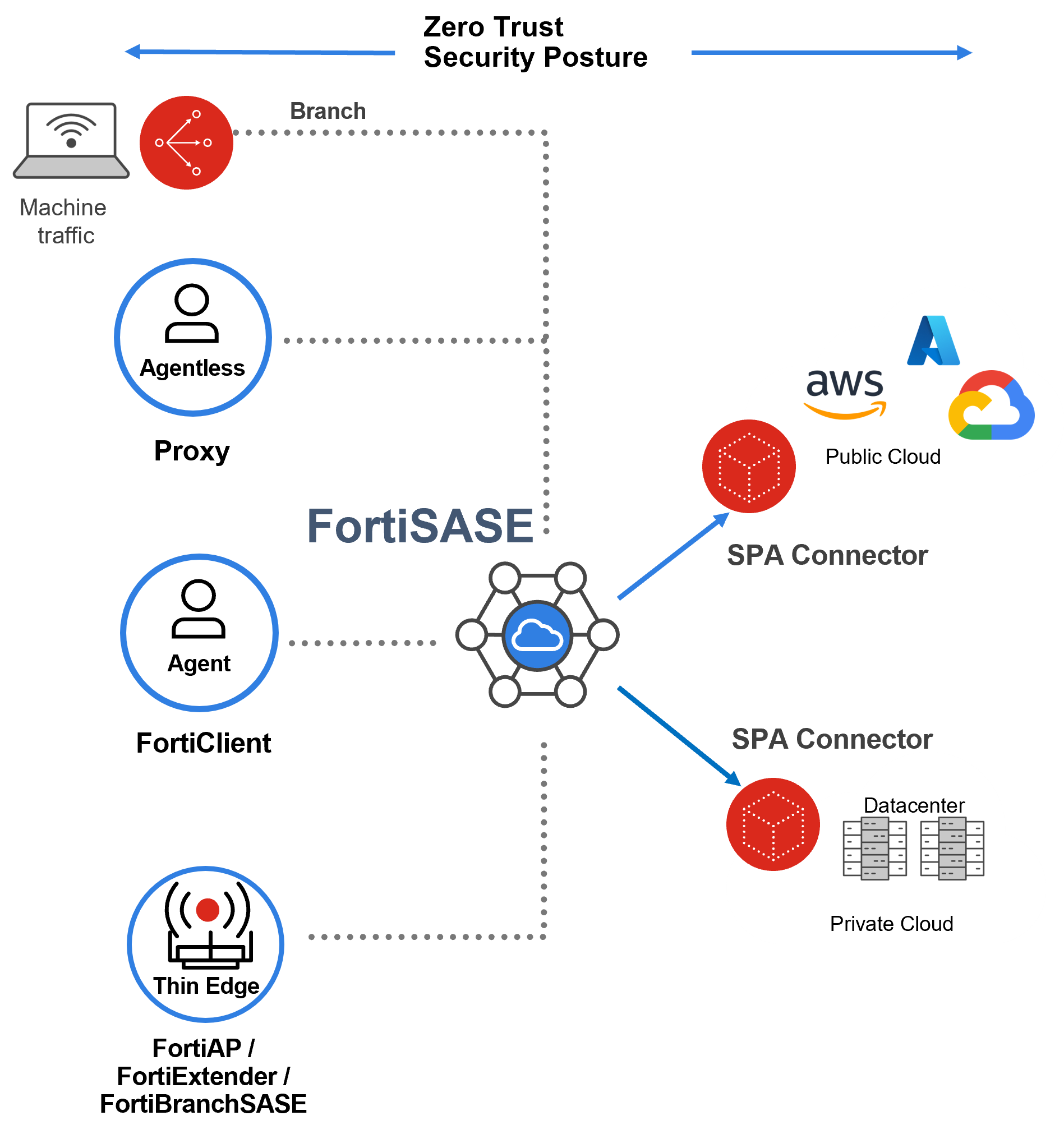
The most common SPA use cases for FortiSASE are described as follows:
|
Direction of traffic flow |
SPA use case |
Description |
|---|---|---|
|
Client-initiated |
Agent access to private applications using the application IP address or domain name and security posture tags |
This is the most common SPA use case. Remote users on supported endpoint devices use FortiClient software to steer traffic to a FortiSASE security PoP and then steer private traffic to the on-prem network over the IPsec tunnel between the FortiSASE security PoP and the SPA Connector. Applications can be accessed via either private IP addresses or domain names when DNS redirection is used. Security posture tags are used for security posture checking. |
|
Agentless access to private web applications for remote users where the installation of FortiClient is not possible. |
Remote users with web browsers supporting Proxy (formerly Secure Web Gateway or SWG) to steer web traffic to a FortiSASE security PoP and then steer private traffic to the on-prem network over the IPsec tunnel between the FortiSASE security PoP and the SPA Connector. Applications are accessed via either private IP addresses or domain names when DNS redirection is used. |
|
|
Agentless access to private web applications using a bookmark portal for unmanaged devices |
Contractors or temporary remote users use browser-only solutions to access private web-based applications from a protected bookmark portal. |
|
|
Access to private applications from on-premises users and devices (servers and IoT) where installation of FortiClient is not feasible |
Branch offices use a Thin Edge device including FortiAP, FortiExtender, or FortiBranchSASE, or a branch device including a FortiGate Secure Edge device or a Branch On-Ramp device to securely access private applications. |
|
|
Server-initiated |
Server-to-Client applications access |
Private application servers securely access remote user endpoints running FortiClient software. |
|
Client-to-Client applications access |
Remote user endpoints running FortiClient software securely access similar remote user endpoints. |
Optionally, remote user endpoints can be configured with pre-logon connectivity. This feature allows onboarding of remote users who have never logged in to their domain-joined Windows endpoints to access the corporate Active Directory (AD) server. These endpoints are preconfigured for pre-logon connectivity.
Moreover, remote user endpoints are configured with autoconnect tunnel connectivity that makes use of automatically connecting to a Security PoP, remembering the login password, and enforcing an always-up tunnel connection.
-
With Windows endpoints, the remember password feature works with OAuth authentication and SAML authentication with IdP support for persistent sessions.
-
With MacOS endpoints, the remember password feature works with SAML authentication with IdP support for persistent sessions.
Intended Audience
Mid-level network and security architects in companies of all sizes and verticals should find this guide helpful.
About this guide
This guide is meant to provide high level insight into FortiSASE architectures for secure access service edge (SASE), namely, Secure Private Access (SPA) use cases and relevant features. It is meant to be used in conjunction with other technical documentation for each of the components listed in the guide. Where relevant, links to the administrative guides and other technical reference guides will be listed. See More information.