

1. Planning
 Plan your FortiSASE deployment by reviewing the following information.
Requirements
The following items are required before you can provision FortiSASE:
|
Requirement |
Description |
|---|---|
|
FortiCloud account |
Create a FortiCloud account if you do not have one. Launching FortiSASE requires a primary FortiCloud account. A primary FortiCloud account can invite other users to launch FortiSASE as secondary users. |
|
Internet access |
You must have internet access to create a FortiSASE instance. |
|
Browser |
Device with a browser to access FortiSASE. |
Licensing
The FortiSASE portal enforces license requirements when you log in. FortiSASE requires the FortiSASE subscription based on the number of remote users. Some FortiSASE features, such as assisted onboarding, require the Advanced, Professional, or Comprehensive license. See the FortiSASE Ordering Guide and Product integration and support for licensing details.
To check the current license entitlement for remote users, go to Monitoring > Dashboards > Status and observe this information in the Remote users widget.
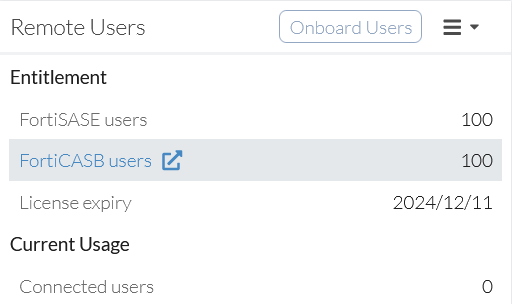
From the screenshot, you can determine the following information:
- Entitlement > FortiSASE users: 100
- Current Usage > Connected users: 0
- Number of FortiSASE users available: 100
The FortiSASE header in the top-left of the portal also reflects license type. An instance with the Advanced, Professional, or Comprehensive license has a modified header with a matching label.
For example, for an instance with an Advanced license, the following header displays:
Learning more
Check out various FortiSASE resources to learn more about FortiSASE before provisioning your instance. See LEARNING MORE.