
Fortinet white logo
Fortinet white logo

Administration Guide

Hybrid PQC support in proxy mode SSL deep inspection

Hybrid PQC support in proxy mode SSL deep inspection

FortiGate supports TLS 1.3 hybrid Post-Quantum Cryptography (PQC) key exchanges in SSL deep inspection (proxy mode), enabling secure traffic inspection. This ensures compatibility with modern browsers and PQC-enabled servers that use hybrid PQC algorithms, such as X25519MLKEM768.

Now, both pure PQC and hybrid PQC are supported in SSL deep inspection:

  • Hybrid PQC algorithms:

    • X25519MLKEM768 (0x11EC)

    • SecP256r1MLKEM768 (0x11EB)

    • SecP384r1MLKEM1024 (0x11ED)

  • Pure PQC algorithms:

    • MLKEM512 (0x1302)

    • MLKEM768 (0x1302)

    • MLKEM1024 (0x1302)

FortiGate can perform SSL deep inspection and the client can access PQC algorithm web servers in proxy mode.

These changes also add support for DNS over TLS, HTTPS (1.0, 2.0, 3.0), POP3, IMAPS, and SMTPS with deep inspection to negotiate hybrid+ML-KEM. Hybrid+ML-KEM and ML-KEM are also supported when these protocols run in a virtual-server or explicit-proxy modes.

Although SIP over TLS and the urlfilter TLS connection to FortiGuard use the same TLS implementation as HTTPS (1.0, 2.0, 3.0), POP3, IMAPS, and SMTPS, they do not yet support hybrid+ML-KEM.

Example

This example demonstrates the following scenarios:

  • How clients can connect to a web server that uses PQC encryption

  • How clients can access through a DNS connection to Cloudflare a web server using hybrid PQC key exchange

First configure the FortiGate for testing, and use the same configuration to test both scenarios.

To configure FortiGate for testing:
  1. On FortiGate, clone a deep-inspection profile and add port 6000-6005 to HTTPS:

    1. Go to Security Profiles > SSL/SSH Inspection.

    2. Select a deep-inspection profile, and click Clone.

    3. Leave Name set to Clone of deep-inspection.

    4. Under Protocol Port Mapping, enable HTTPS, and enter 443,6000,6001,6002,6003,6004,6005.

    5. Click OK to save the changes to Clone of deep-inspection.

  2. Add Port Range 6000–6005 to the HTTPS Service:

    1. Go to Policy & Objects > Service.

    2. Locate the service named HTTPS and click Edit.

    3. In the Edit Service window, scroll to the Protocol Options section.

    4. Under Destination Port, click + to add a new port entry.

    5. Set the second entry to:

      • Protocol: TCP

      • Low: 6000

      • High: 6005

    6. Confirm the configuration and click OK to save the service.

  3. On FortiGate, configure a policy and select the Clone of deep-inspection profile.

    config firewall policy
       edit 1
           set srcintf "port2"
           set dstintf "port1"
           set action accept
           set srcaddr "all"
           set dstaddr "all"
           set schedule "always"
           set service "ALL"
           set utm-status enable
           set inspection-mode proxy
           set ssl-ssh-profile "Clone of deep-inspection"
           set av-profile "av"
           set logtraffic all
           set nat enable
      next
    end
  4. Test the following scenarios:

Connect to a web server that uses PQC encryption

test.openquantumsafe.org:6000 supports the X25519MLKEM768 key exchange algorithm. Previously, hybrid PQC algorithm was downgraded to non-ML-KEM encryption, and the site would be unreachable. Now, the client can access the web server using hybrid PQC key exchange.

Send DNS to a Cloudflare DNS server that uses PQC encryption

To test the example:
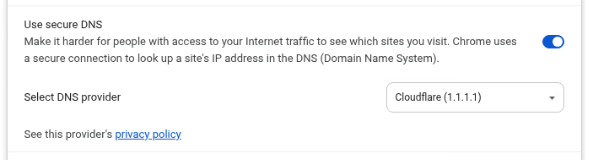
  1. In a browser, enable secure DNS connection with Cloudflare (1.1.1.1) to force DNS over TLS.
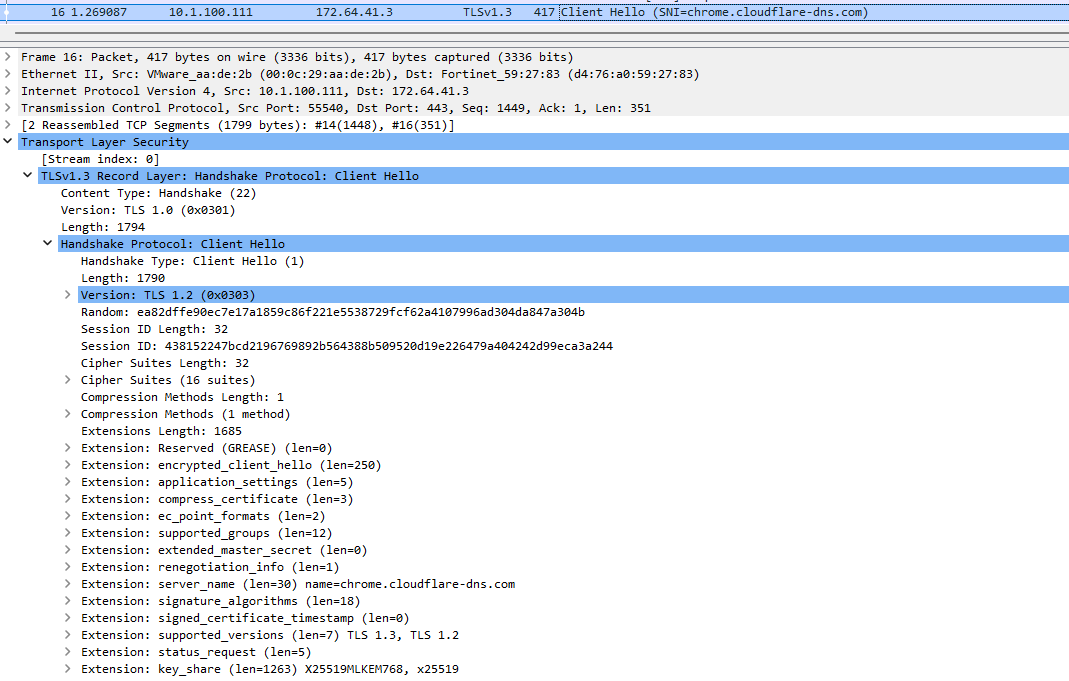
  2. Packet capture shows that the Client Hello sent to the Cloudflare DNS server uses X25519MLKEM768.
Hybrid PQC support in proxy mode SSL deep inspection

Hybrid PQC support in proxy mode SSL deep inspection

FortiGate supports TLS 1.3 hybrid Post-Quantum Cryptography (PQC) key exchanges in SSL deep inspection (proxy mode), enabling secure traffic inspection. This ensures compatibility with modern browsers and PQC-enabled servers that use hybrid PQC algorithms, such as X25519MLKEM768.

Now, both pure PQC and hybrid PQC are supported in SSL deep inspection:

  • Hybrid PQC algorithms:

    • X25519MLKEM768 (0x11EC)

    • SecP256r1MLKEM768 (0x11EB)

    • SecP384r1MLKEM1024 (0x11ED)

  • Pure PQC algorithms:

    • MLKEM512 (0x1302)

    • MLKEM768 (0x1302)

    • MLKEM1024 (0x1302)

FortiGate can perform SSL deep inspection and the client can access PQC algorithm web servers in proxy mode.

These changes also add support for DNS over TLS, HTTPS (1.0, 2.0, 3.0), POP3, IMAPS, and SMTPS with deep inspection to negotiate hybrid+ML-KEM. Hybrid+ML-KEM and ML-KEM are also supported when these protocols run in a virtual-server or explicit-proxy modes.

Although SIP over TLS and the urlfilter TLS connection to FortiGuard use the same TLS implementation as HTTPS (1.0, 2.0, 3.0), POP3, IMAPS, and SMTPS, they do not yet support hybrid+ML-KEM.

Example

This example demonstrates the following scenarios:

  • How clients can connect to a web server that uses PQC encryption

  • How clients can access through a DNS connection to Cloudflare a web server using hybrid PQC key exchange

First configure the FortiGate for testing, and use the same configuration to test both scenarios.

To configure FortiGate for testing:
  1. On FortiGate, clone a deep-inspection profile and add port 6000-6005 to HTTPS:

    1. Go to Security Profiles > SSL/SSH Inspection.

    2. Select a deep-inspection profile, and click Clone.

    3. Leave Name set to Clone of deep-inspection.

    4. Under Protocol Port Mapping, enable HTTPS, and enter 443,6000,6001,6002,6003,6004,6005.

    5. Click OK to save the changes to Clone of deep-inspection.

  2. Add Port Range 6000–6005 to the HTTPS Service:

    1. Go to Policy & Objects > Service.

    2. Locate the service named HTTPS and click Edit.

    3. In the Edit Service window, scroll to the Protocol Options section.

    4. Under Destination Port, click + to add a new port entry.

    5. Set the second entry to:

      • Protocol: TCP

      • Low: 6000

      • High: 6005

    6. Confirm the configuration and click OK to save the service.

  3. On FortiGate, configure a policy and select the Clone of deep-inspection profile.

    config firewall policy
       edit 1
           set srcintf "port2"
           set dstintf "port1"
           set action accept
           set srcaddr "all"
           set dstaddr "all"
           set schedule "always"
           set service "ALL"
           set utm-status enable
           set inspection-mode proxy
           set ssl-ssh-profile "Clone of deep-inspection"
           set av-profile "av"
           set logtraffic all
           set nat enable
      next
    end
  4. Test the following scenarios:

Connect to a web server that uses PQC encryption

test.openquantumsafe.org:6000 supports the X25519MLKEM768 key exchange algorithm. Previously, hybrid PQC algorithm was downgraded to non-ML-KEM encryption, and the site would be unreachable. Now, the client can access the web server using hybrid PQC key exchange.

Send DNS to a Cloudflare DNS server that uses PQC encryption

To test the example:
  1. In a browser, enable secure DNS connection with Cloudflare (1.1.1.1) to force DNS over TLS.

  2. Packet capture shows that the Client Hello sent to the Cloudflare DNS server uses X25519MLKEM768.