
Fortinet white logo
Fortinet white logo

Administration Guide

Internet service database objects

Internet service database objects

The Internet Service Database (ISDB) is a comprehensive public IP address database that combines IP address range, IP owner, service port number, and IP security credibility. The data comes from the FortiGuard service system. Information is regularly added to this database, for example, geographic location, IP reputation, popularity & DNS, and so on.

You can use the contents of this database as criteria for inclusion or exclusion in a policy as you would other object types, such as addresses.
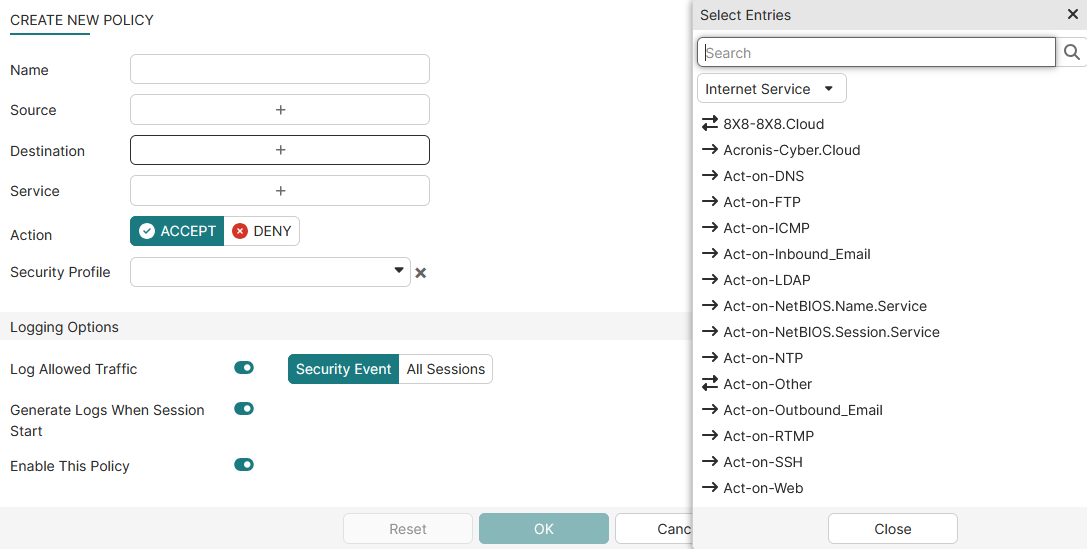
To use an ISDB object in a security policy:
  1. Create or edit a security policy.

  2. In Source or Destination, click + to open the Select Entries pane.

  3. Click Internet Service and select an ISDB object.

    Tooltip

    If Destination is set to an ISDB object, Service is disabled.

  4. Configure the rest of the policy and click OK.

Internet service database objects

Internet service database objects

The Internet Service Database (ISDB) is a comprehensive public IP address database that combines IP address range, IP owner, service port number, and IP security credibility. The data comes from the FortiGuard service system. Information is regularly added to this database, for example, geographic location, IP reputation, popularity & DNS, and so on.

You can use the contents of this database as criteria for inclusion or exclusion in a policy as you would other object types, such as addresses.

To use an ISDB object in a security policy:
  1. Create or edit a security policy.

  2. In Source or Destination, click + to open the Select Entries pane.

  3. Click Internet Service and select an ISDB object.

    Tooltip

    If Destination is set to an ISDB object, Service is disabled.

  4. Configure the rest of the policy and click OK.