Fortinet white logo
Fortinet white logo

Administration Guide

Load balancing IPsec VPN gateways with a single FQDN

Load balancing IPsec VPN gateways with a single FQDN

FortiClient supports load balancing IPsec VPN gateways with a single fully qualified domain name (FQDN). This feature simplifies configuration management, reducing the need for users to manually select specific VPN gateway IP addresses.

Before IPsec VPN authentication, FortiClient resolves the FQDN to an IP address and saves it in the hosts file to ensure it remains connected to the same FortiGate throughout the tunnel establishment process, including authentication and tunnel creation. However, since DNS servers may return IP addresses using round robin, FortiClient may resolve the FQDN to a different FortiGate during login, leading to connection inconsistencies and IPsec VPN connection failure. This feature enables FortiClient to connect to different FortiGate IP addresses under a single FQDN. If a FortiGate is down, FortiClient can attempt to connect to it until the next DNS resolution provides an alternative IP address.

The example deployment consists of the following components:

  • Three FortiGates acting as remote gateways, with the following IP addresses:

    Remote gateway

    IP address

    FGTVM_0_182

    10.152.35.182

    FGTVM_1_183

    10.152.35.183

    FGTVM_2_184

    10.152.35.184

  • Single FQDN mapping the three FortiGates on the DNS server: fgtvms.fortinet-fsso.com
  • Microsoft Entra ID user to support SAML login for FortiClient VPN
To configure the DNS server:
  1. Create three A records on the DNS server to map a single FQDN to three different IP addresses, each corresponding to a remote VPN gateway.

  2. Run nslookup to confirm that the FQDN resolves to the three IP addresses.
    C:\Windows\system32>nslookup fgtvms.fortinet-fsso.com
    Server:	dover.fortinet-fsso.com
    Address:	10.152.35.196
    
    Name:		fgtvms.fortinet-fsso.com
    Addresses:	10.152.35.182
    		10.152.35.183
    		10.152.35.184
To configure FortiOS:
  1. Configure a user for Entra ID SAML login:
    config user saml
        edit "saml_azure"
            set entity-id "https://fgtvms.fortinet-fsso.com:1234/remote/saml/metadata"
            set single-sign-on-url "https://fgtvms.fortinet-fsso.com:1234/remote/saml/login"
            set single-logout-url "https://fgtvms.fortinet-fsso.com:1234/remote/saml/logout"
            set idp-entity-id "https://sts.windows.net/f1a72219-bba3-4f6e-93b8-ce3b341b7cf4/"
            set idp-single-sign-on-url "https://login.microsoftonline.com/f1a72219-bba3-4f6e-93b8-ce3b341b7cf4/saml2"
            set idp-single-logout-url "https://login.microsoftonline.com/f1a72219-bba3-4f6e-93b8-ce3b341b7cf4/saml2"
            set idp-cert "REMOTE_Cert_1"
            set user-name "http://schemas.microsoft.com/identity/claims/displayname"
            set group-name "user.groups"
            set digest-method sha1
        next
    end
  2. Configure a VPN authentication user group that includes the user that you created in step 1:

    config user group edit "saml_grp" set member "saml_azure" next end

  3. Configure an IPsec VPN IKEv2 tunnel:
    config vpn ipsec phase1-interface
        edit "IKEV2-SAML-AZ"
            set type dynamic
            set interface "port1"
            set ike-version 2
            set peertype any
            set net-device disable
            set mode-cfg enable
            set ipv4-dns-server1 10.152.35.196
            set proposal aes128-sha256 aes256-sha256
            set comments "VPN: IKEV2_SAML_AZ (Created by VPN wizard)"
            set dhgrp 5
            set eap enable
            set eap-identity send-request
            set wizard-type dialup-forticlient
            set authusrgrp "saml_grp"
            set network-overlay enable
            set network-id 20
            set transport tcp
            set ipv4-start-ip 10.10.182.100 ## <<< or 10.10.183.100 or 10.10.184.100
            set ipv4-end-ip 10.10.182.200
            set save-password enable
            set client-auto-negotiate enable
            set client-keep-alive enable
            set psksecret ENC y77chAtwvT25RPgnZTM5Xq51TzPpGjVKQ53r3kFUE5eQQmp1t8gxFSgXBth5nHCGChzcNB7VJhSUxmfCVOuz1c7qlS+n6eRSs73jOGxUH++k3FgzVmFMmzidFW9nIA5/AqvUpPDL8tddMPsItRmtW/TLU355pYFHYa9RFB1UVuqTxZXlnJGqG51S54fbZF2C5lvptVlmMjY3dkVA
        next
    end
    config vpn ipsec phase2-interface
        edit "IKEV2_SAML_AZ"
            set phase1name "IKEV2-SAML-AZ"
            set proposal aes128-sha256 aes256-sha256
            set comments "VPN: IKEV2_SAML_AZ (Created by VPN wizard)"
        next
    end
To configure EMS:
  1. In EMS, go to Endpoint Profiles > Remote Access.
  2. Create a new profile or edit an existing one.
  3. Under VPN Tunnels, click Add.
  4. For Type, select IPsec VPN.
  5. In the Remote Gateway field, enter the FQDN. In this example, it is fgtvms.fortinet-fsso.com.
  6. In Advanced Settings, toggle on Enable SAML Login.
  7. Configure other fields as desired, then save.

The following shows example XML configuration:

<forticlient_configuration>
       <vpn>
              <enabled>1</enabled>
              <ipsecvpn>
                     <connections>
                           <connection>
                                  <name>IPSec-SAML-IntWeb</name>
                                  <uid>19527DD4-406D-48E1-9070-2FA86EB30254</uid>
                                  <machine>0</machine>
                                  <keep_running>0</keep_running>
                                  <keep_fqdn_resolution_consistency>1</keep_fqdn_resolution_consistency>
                                  <disclaimer_msg/>
                                  <single_user_mode>0</single_user_mode>
                                  <type>manual</type>
                                  <ui>
                                         <show_remember_password>1</show_remember_password>
                                         <show_alwaysup>1</show_alwaysup>
                                         <show_autoconnect>1</show_autoconnect>
                                         <show_passcode>0</show_passcode>
                                         <save_username>0</save_username>
                                  </ui>
                                  <redundant_sort_method>0</redundant_sort_method>
                                  <tags>
                                         <allowed/>
                                         <prohibited/>
                                  </tags>
                                  <host_check_fail_warning/>
                                  <ike_settings>
                                         <server>fgtvms.fortinet-fsso.com</server>
                                         <authentication_method>Preshared Key</authentication_method>
                                         <transport_mode>1</transport_mode>
                                         <session_resume>1</session_resume>
                                         <tcp_port>4500</tcp_port>
                                         <udp_port>500</udp_port>
                                         <fgt>1</fgt>
                                         <prompt_certificate>0</prompt_certificate>
                                         <xauth>
                                                <use_otp>0</use_otp>
                                                <enabled>1</enabled>
                                                <prompt_username>1</prompt_username>
                                         </xauth>
                                         <version>2</version>
                                         <mode>aggressive</mode>
                                         <key_life>86400</key_life>
                                         <localid/>
                                         <networkid>20</networkid>
                                         <implied_SPDO>0</implied_SPDO>
                                         <implied_SPDO_timeout>0</implied_SPDO_timeout>
                                         <nat_traversal>1</nat_traversal>
                                         <nat_alive_freq>5</nat_alive_freq>
                                         <enable_local_lan>0</enable_local_lan>
                                         <enable_ike_fragmentation>0</enable_ike_fragmentation>
                                         <mode_config>1</mode_config>
                                         <dpd>1</dpd>
                                         <run_fcauth_system>0</run_fcauth_system>
                                         <sso_enabled>1</sso_enabled>
                                         <use_external_browser>0</use_external_browser>
                                         <ike_saml_port>1234</ike_saml_port>
                                         <dpd_retry_count>3</dpd_retry_count>
                                         <dpd_retry_interval>5</dpd_retry_interval>
                                         <auth_data>
                                                <preshared_key>Enc 41ea469c65f8ab068dc4ccf7f5f2544133fd01262b6d0e3536b2c17ccb8d</preshared_key>
                                         </auth_data>
                                         <xauth_timeout>120</xauth_timeout>
                                         <dhgroup>5</dhgroup>
                                         <proposals>
                                                <proposal>AES128|SHA256</proposal>
                                                <proposal>AES256|SHA256</proposal>
                                         </proposals>
                                  </ike_settings>
                                  <ipsec_settings>
                                         <remote_networks>
                                                <network>
                                                       <addr>0.0.0.0</addr>
                                                       <mask>0.0.0.0</mask>
                                                </network>
                                                <network>
                                                       <addr>::/0</addr>
                                                       <mask>::/0</mask>
                                                </network>
                                         </remote_networks>
                                         <dhgroup>5</dhgroup>
                                         <key_life_type>seconds</key_life_type>
                                         <key_life_seconds>43200</key_life_seconds>
                                         <key_life_Kbytes>5200</key_life_Kbytes>
                                         <replay_detection>1</replay_detection>
                                         <pfs>1</pfs>
                                         <use_vip>1</use_vip>
                                         <virtualip>
                                                <type>modeconfig</type>
                                                <ip>0.0.0.0</ip>
                                                <mask>0.0.0.0</mask>
                                                <dnsserver>0.0.0.0</dnsserver>
                                                <winserver>0.0.0.0</winserver>
                                         </virtualip>
                                         <proposals>
                                                <proposal>AES128|SHA256</proposal>
                                                <proposal>AES256|SHA256</proposal>
                                         </proposals>
                                  </ipsec_settings>
                                  <android_cert_path/>
                                  <warn_invalid_server_certificate>1</warn_invalid_server_certificate>
                                  <on_connect>
                                         <script>
                                                <os>windows</os>
                                                <script/>
                                         </script>
                                         <script>
                                                <os>MacOSX</os>
                                                <script/>
                                         </script>
                                         <script>
                                                <os>linux</os>
                                                <script/>
                                         </script>
                                  </on_connect>
                                  <on_disconnect>
                                         <script>
                                                <os>windows</os>
                                                <script/>
                                         </script>
                                          <script>
                                                <os>MacOSX</os>
                                                <script/>
                                         </script>
                                         <script>
                                                <os>linux</os>
                                                <script/>
                                         </script>
                                  </on_disconnect>
                                  <traffic_control>
                                         <enabled>0</enabled>
                                         <mode>1</mode>
                                  </traffic_control>
                           </connection>
                     </connections>
                     <options>
                           <use_win_current_user_cert>1</use_win_current_user_cert>
                           <enabled>1</enabled>
                           <enable_udp_checksum>0</enable_udp_checksum>
                           <usewincert>1</usewincert>
                           <check_for_cert_private_key>0</check_for_cert_private_key>
                           <block_ipv6>1</block_ipv6>
                           <use_win_local_computer_cert>1</use_win_local_computer_cert>
                           <disable_default_route>0</disable_default_route>
                           <enhanced_key_usage_mandatory>0</enhanced_key_usage_mandatory>
                           <uselocalcert>0</uselocalcert>
                           <usesmcardcert>1</usesmcardcert>
                           <show_auth_cert_only>0</show_auth_cert_only>
                           <no_dns_registration>0</no_dns_registration>
                           <beep_if_error>0</beep_if_error>
                            <disallow_invalid_server_certificate>0</disallow_invalid_server_certificate>
                     </options>
              </ipsecvpn>
              <options>
                     <show_negotiation_wnd>0</show_negotiation_wnd>
                     <use_legacy_vpn_before_logon>0</use_legacy_vpn_before_logon>
                     <use_windows_credentials>0</use_windows_credentials>
                     <show_vpn_before_logon>1</show_vpn_before_logon>
                     <autoconnect_on_install>0</autoconnect_on_install>
                     <secure_remote_access>0</secure_remote_access>
                     <on_os_start_connect/>
                     <certs_require_keyspec>0</certs_require_keyspec>
                     <suppress_vpn_notification>0</suppress_vpn_notification>
                     <allow_personal_vpns>1</allow_personal_vpns>
                     <keep_running_max_tries>0</keep_running_max_tries>
                     <autoconnect_only_when_offnet>0</autoconnect_only_when_offnet>
                     <minimize_window_on_connect>0</minimize_window_on_connect>
                     <disable_connect_disconnect>0</disable_connect_disconnect>
                     <on_os_start_connect_has_priority>0</on_os_start_connect_has_priority>
                     <after_logon_saml_auth>2</after_logon_saml_auth>
                     <disable_internet_check>1</disable_internet_check>
                     <current_connection_name>IPSec-SAML-IntWeb</current_connection_name>
                     <current_connection_type>ipsec</current_connection_type>
              </options>
       </vpn>
</forticlient_configuration>
To verify the configuration using FortiClient:
  1. On three endpoints that received the profile updates, open FortiClient.
  2. On the Remote Access tab, from the VPN Name dropdown list, select the configured IPsec VPN tunnel.
  3. Click Connect.
  4. FortiClient displays an authentication dialog. Enter the Entra ID credentials. If configured, you may also perform multifactor authentication.

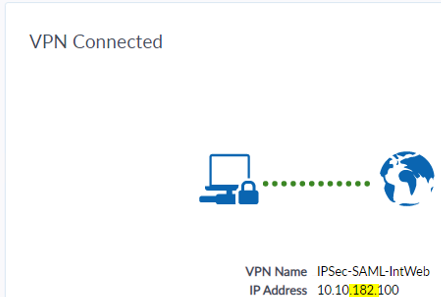
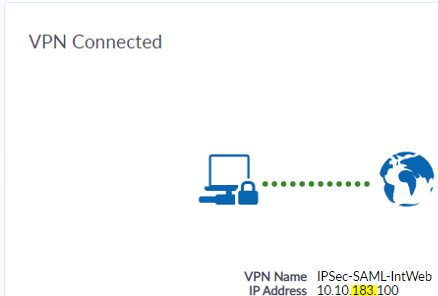
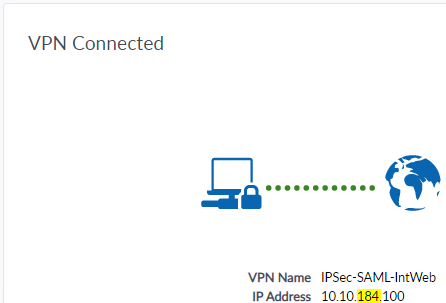
The endpoints connect to the VPN gateways using the configured FQDN, fgtvm.fortinet-fsso.com. On the Remote Access tab, you can confirm in the IP Address field that the endpoints have connected to different IP addresses as corresponds to the three remote gateways:

Remote gateway

IP address

FGTVM_0_182

10.152.35.182

FGTVM_1_183

10.152.35.183

FGTVM_2_184

10.152.35.184

Note

Round robin DNS does not ensure even distribution, as DNS caching and query timing may result in some clients resolving to the same IP address rather than a perfectly balanced spread. If one gateway goes offline, an endpoint that previously resolved to that gateway randomly selects one of the available gateways based o the round robin DNS response.

Load balancing IPsec VPN gateways with a single FQDN

Load balancing IPsec VPN gateways with a single FQDN

FortiClient supports load balancing IPsec VPN gateways with a single fully qualified domain name (FQDN). This feature simplifies configuration management, reducing the need for users to manually select specific VPN gateway IP addresses.

Before IPsec VPN authentication, FortiClient resolves the FQDN to an IP address and saves it in the hosts file to ensure it remains connected to the same FortiGate throughout the tunnel establishment process, including authentication and tunnel creation. However, since DNS servers may return IP addresses using round robin, FortiClient may resolve the FQDN to a different FortiGate during login, leading to connection inconsistencies and IPsec VPN connection failure. This feature enables FortiClient to connect to different FortiGate IP addresses under a single FQDN. If a FortiGate is down, FortiClient can attempt to connect to it until the next DNS resolution provides an alternative IP address.

The example deployment consists of the following components:

  • Three FortiGates acting as remote gateways, with the following IP addresses:

    Remote gateway

    IP address

    FGTVM_0_182

    10.152.35.182

    FGTVM_1_183

    10.152.35.183

    FGTVM_2_184

    10.152.35.184

  • Single FQDN mapping the three FortiGates on the DNS server: fgtvms.fortinet-fsso.com
  • Microsoft Entra ID user to support SAML login for FortiClient VPN
To configure the DNS server:
  1. Create three A records on the DNS server to map a single FQDN to three different IP addresses, each corresponding to a remote VPN gateway.

  2. Run nslookup to confirm that the FQDN resolves to the three IP addresses.
    C:\Windows\system32>nslookup fgtvms.fortinet-fsso.com
    Server:	dover.fortinet-fsso.com
    Address:	10.152.35.196
    
    Name:		fgtvms.fortinet-fsso.com
    Addresses:	10.152.35.182
    		10.152.35.183
    		10.152.35.184
To configure FortiOS:
  1. Configure a user for Entra ID SAML login:
    config user saml
        edit "saml_azure"
            set entity-id "https://fgtvms.fortinet-fsso.com:1234/remote/saml/metadata"
            set single-sign-on-url "https://fgtvms.fortinet-fsso.com:1234/remote/saml/login"
            set single-logout-url "https://fgtvms.fortinet-fsso.com:1234/remote/saml/logout"
            set idp-entity-id "https://sts.windows.net/f1a72219-bba3-4f6e-93b8-ce3b341b7cf4/"
            set idp-single-sign-on-url "https://login.microsoftonline.com/f1a72219-bba3-4f6e-93b8-ce3b341b7cf4/saml2"
            set idp-single-logout-url "https://login.microsoftonline.com/f1a72219-bba3-4f6e-93b8-ce3b341b7cf4/saml2"
            set idp-cert "REMOTE_Cert_1"
            set user-name "http://schemas.microsoft.com/identity/claims/displayname"
            set group-name "user.groups"
            set digest-method sha1
        next
    end
  2. Configure a VPN authentication user group that includes the user that you created in step 1:

    config user group edit "saml_grp" set member "saml_azure" next end

  3. Configure an IPsec VPN IKEv2 tunnel:
    config vpn ipsec phase1-interface
        edit "IKEV2-SAML-AZ"
            set type dynamic
            set interface "port1"
            set ike-version 2
            set peertype any
            set net-device disable
            set mode-cfg enable
            set ipv4-dns-server1 10.152.35.196
            set proposal aes128-sha256 aes256-sha256
            set comments "VPN: IKEV2_SAML_AZ (Created by VPN wizard)"
            set dhgrp 5
            set eap enable
            set eap-identity send-request
            set wizard-type dialup-forticlient
            set authusrgrp "saml_grp"
            set network-overlay enable
            set network-id 20
            set transport tcp
            set ipv4-start-ip 10.10.182.100 ## <<< or 10.10.183.100 or 10.10.184.100
            set ipv4-end-ip 10.10.182.200
            set save-password enable
            set client-auto-negotiate enable
            set client-keep-alive enable
            set psksecret ENC y77chAtwvT25RPgnZTM5Xq51TzPpGjVKQ53r3kFUE5eQQmp1t8gxFSgXBth5nHCGChzcNB7VJhSUxmfCVOuz1c7qlS+n6eRSs73jOGxUH++k3FgzVmFMmzidFW9nIA5/AqvUpPDL8tddMPsItRmtW/TLU355pYFHYa9RFB1UVuqTxZXlnJGqG51S54fbZF2C5lvptVlmMjY3dkVA
        next
    end
    config vpn ipsec phase2-interface
        edit "IKEV2_SAML_AZ"
            set phase1name "IKEV2-SAML-AZ"
            set proposal aes128-sha256 aes256-sha256
            set comments "VPN: IKEV2_SAML_AZ (Created by VPN wizard)"
        next
    end
To configure EMS:
  1. In EMS, go to Endpoint Profiles > Remote Access.
  2. Create a new profile or edit an existing one.
  3. Under VPN Tunnels, click Add.
  4. For Type, select IPsec VPN.
  5. In the Remote Gateway field, enter the FQDN. In this example, it is fgtvms.fortinet-fsso.com.
  6. In Advanced Settings, toggle on Enable SAML Login.
  7. Configure other fields as desired, then save.

The following shows example XML configuration:

<forticlient_configuration>
       <vpn>
              <enabled>1</enabled>
              <ipsecvpn>
                     <connections>
                           <connection>
                                  <name>IPSec-SAML-IntWeb</name>
                                  <uid>19527DD4-406D-48E1-9070-2FA86EB30254</uid>
                                  <machine>0</machine>
                                  <keep_running>0</keep_running>
                                  <keep_fqdn_resolution_consistency>1</keep_fqdn_resolution_consistency>
                                  <disclaimer_msg/>
                                  <single_user_mode>0</single_user_mode>
                                  <type>manual</type>
                                  <ui>
                                         <show_remember_password>1</show_remember_password>
                                         <show_alwaysup>1</show_alwaysup>
                                         <show_autoconnect>1</show_autoconnect>
                                         <show_passcode>0</show_passcode>
                                         <save_username>0</save_username>
                                  </ui>
                                  <redundant_sort_method>0</redundant_sort_method>
                                  <tags>
                                         <allowed/>
                                         <prohibited/>
                                  </tags>
                                  <host_check_fail_warning/>
                                  <ike_settings>
                                         <server>fgtvms.fortinet-fsso.com</server>
                                         <authentication_method>Preshared Key</authentication_method>
                                         <transport_mode>1</transport_mode>
                                         <session_resume>1</session_resume>
                                         <tcp_port>4500</tcp_port>
                                         <udp_port>500</udp_port>
                                         <fgt>1</fgt>
                                         <prompt_certificate>0</prompt_certificate>
                                         <xauth>
                                                <use_otp>0</use_otp>
                                                <enabled>1</enabled>
                                                <prompt_username>1</prompt_username>
                                         </xauth>
                                         <version>2</version>
                                         <mode>aggressive</mode>
                                         <key_life>86400</key_life>
                                         <localid/>
                                         <networkid>20</networkid>
                                         <implied_SPDO>0</implied_SPDO>
                                         <implied_SPDO_timeout>0</implied_SPDO_timeout>
                                         <nat_traversal>1</nat_traversal>
                                         <nat_alive_freq>5</nat_alive_freq>
                                         <enable_local_lan>0</enable_local_lan>
                                         <enable_ike_fragmentation>0</enable_ike_fragmentation>
                                         <mode_config>1</mode_config>
                                         <dpd>1</dpd>
                                         <run_fcauth_system>0</run_fcauth_system>
                                         <sso_enabled>1</sso_enabled>
                                         <use_external_browser>0</use_external_browser>
                                         <ike_saml_port>1234</ike_saml_port>
                                         <dpd_retry_count>3</dpd_retry_count>
                                         <dpd_retry_interval>5</dpd_retry_interval>
                                         <auth_data>
                                                <preshared_key>Enc 41ea469c65f8ab068dc4ccf7f5f2544133fd01262b6d0e3536b2c17ccb8d</preshared_key>
                                         </auth_data>
                                         <xauth_timeout>120</xauth_timeout>
                                         <dhgroup>5</dhgroup>
                                         <proposals>
                                                <proposal>AES128|SHA256</proposal>
                                                <proposal>AES256|SHA256</proposal>
                                         </proposals>
                                  </ike_settings>
                                  <ipsec_settings>
                                         <remote_networks>
                                                <network>
                                                       <addr>0.0.0.0</addr>
                                                       <mask>0.0.0.0</mask>
                                                </network>
                                                <network>
                                                       <addr>::/0</addr>
                                                       <mask>::/0</mask>
                                                </network>
                                         </remote_networks>
                                         <dhgroup>5</dhgroup>
                                         <key_life_type>seconds</key_life_type>
                                         <key_life_seconds>43200</key_life_seconds>
                                         <key_life_Kbytes>5200</key_life_Kbytes>
                                         <replay_detection>1</replay_detection>
                                         <pfs>1</pfs>
                                         <use_vip>1</use_vip>
                                         <virtualip>
                                                <type>modeconfig</type>
                                                <ip>0.0.0.0</ip>
                                                <mask>0.0.0.0</mask>
                                                <dnsserver>0.0.0.0</dnsserver>
                                                <winserver>0.0.0.0</winserver>
                                         </virtualip>
                                         <proposals>
                                                <proposal>AES128|SHA256</proposal>
                                                <proposal>AES256|SHA256</proposal>
                                         </proposals>
                                  </ipsec_settings>
                                  <android_cert_path/>
                                  <warn_invalid_server_certificate>1</warn_invalid_server_certificate>
                                  <on_connect>
                                         <script>
                                                <os>windows</os>
                                                <script/>
                                         </script>
                                         <script>
                                                <os>MacOSX</os>
                                                <script/>
                                         </script>
                                         <script>
                                                <os>linux</os>
                                                <script/>
                                         </script>
                                  </on_connect>
                                  <on_disconnect>
                                         <script>
                                                <os>windows</os>
                                                <script/>
                                         </script>
                                          <script>
                                                <os>MacOSX</os>
                                                <script/>
                                         </script>
                                         <script>
                                                <os>linux</os>
                                                <script/>
                                         </script>
                                  </on_disconnect>
                                  <traffic_control>
                                         <enabled>0</enabled>
                                         <mode>1</mode>
                                  </traffic_control>
                           </connection>
                     </connections>
                     <options>
                           <use_win_current_user_cert>1</use_win_current_user_cert>
                           <enabled>1</enabled>
                           <enable_udp_checksum>0</enable_udp_checksum>
                           <usewincert>1</usewincert>
                           <check_for_cert_private_key>0</check_for_cert_private_key>
                           <block_ipv6>1</block_ipv6>
                           <use_win_local_computer_cert>1</use_win_local_computer_cert>
                           <disable_default_route>0</disable_default_route>
                           <enhanced_key_usage_mandatory>0</enhanced_key_usage_mandatory>
                           <uselocalcert>0</uselocalcert>
                           <usesmcardcert>1</usesmcardcert>
                           <show_auth_cert_only>0</show_auth_cert_only>
                           <no_dns_registration>0</no_dns_registration>
                           <beep_if_error>0</beep_if_error>
                            <disallow_invalid_server_certificate>0</disallow_invalid_server_certificate>
                     </options>
              </ipsecvpn>
              <options>
                     <show_negotiation_wnd>0</show_negotiation_wnd>
                     <use_legacy_vpn_before_logon>0</use_legacy_vpn_before_logon>
                     <use_windows_credentials>0</use_windows_credentials>
                     <show_vpn_before_logon>1</show_vpn_before_logon>
                     <autoconnect_on_install>0</autoconnect_on_install>
                     <secure_remote_access>0</secure_remote_access>
                     <on_os_start_connect/>
                     <certs_require_keyspec>0</certs_require_keyspec>
                     <suppress_vpn_notification>0</suppress_vpn_notification>
                     <allow_personal_vpns>1</allow_personal_vpns>
                     <keep_running_max_tries>0</keep_running_max_tries>
                     <autoconnect_only_when_offnet>0</autoconnect_only_when_offnet>
                     <minimize_window_on_connect>0</minimize_window_on_connect>
                     <disable_connect_disconnect>0</disable_connect_disconnect>
                     <on_os_start_connect_has_priority>0</on_os_start_connect_has_priority>
                     <after_logon_saml_auth>2</after_logon_saml_auth>
                     <disable_internet_check>1</disable_internet_check>
                     <current_connection_name>IPSec-SAML-IntWeb</current_connection_name>
                     <current_connection_type>ipsec</current_connection_type>
              </options>
       </vpn>
</forticlient_configuration>
To verify the configuration using FortiClient:
  1. On three endpoints that received the profile updates, open FortiClient.
  2. On the Remote Access tab, from the VPN Name dropdown list, select the configured IPsec VPN tunnel.
  3. Click Connect.
  4. FortiClient displays an authentication dialog. Enter the Entra ID credentials. If configured, you may also perform multifactor authentication.

The endpoints connect to the VPN gateways using the configured FQDN, fgtvm.fortinet-fsso.com. On the Remote Access tab, you can confirm in the IP Address field that the endpoints have connected to different IP addresses as corresponds to the three remote gateways:

Remote gateway

IP address

FGTVM_0_182

10.152.35.182

FGTVM_1_183

10.152.35.183

FGTVM_2_184

10.152.35.184

Note

Round robin DNS does not ensure even distribution, as DNS caching and query timing may result in some clients resolving to the same IP address rather than a perfectly balanced spread. If one gateway goes offline, an endpoint that previously resolved to that gateway randomly selects one of the available gateways based o the round robin DNS response.