Fortinet white logo
Fortinet white logo

Administration Guide

Adding a secondary admin account

Adding a secondary admin account

The FortiEndpoint primary administrator (the user who created the FortiEndpoint instance) can add secondary administrators from their FortiCloud account.

To create a secondary admin account:
  1. Log in to Fortinet Service & Support with your FortiCloud account.
  2. Click your account name in the top right corner, then select My Account.
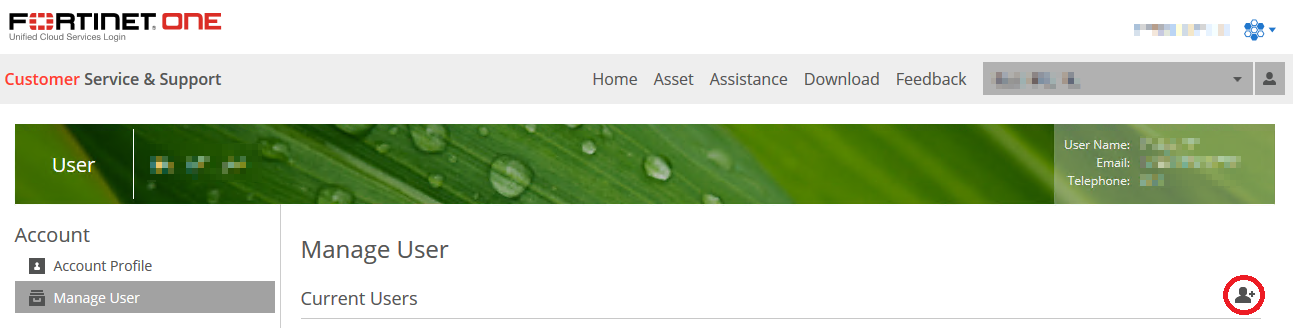
  3. Select Manage User.
  4. Click the Add User icon.

  5. Enter the user information as required. If the new user does not have a FortiCloud account, they must create one. Click Save. A user added on this page becomes visible on the FortiEndpoint GUI in Administrators and can log in to FortiEndpoint with their FortiCloud account. These users have limited permissions. For details on configuring permissions for these administrators, see Admin roles.

FortiEndpoint supports resource-based access control using FortiCloud permission profiles. See Creating a permission profile.

Adding a secondary admin account

Adding a secondary admin account

The FortiEndpoint primary administrator (the user who created the FortiEndpoint instance) can add secondary administrators from their FortiCloud account.

To create a secondary admin account:
  1. Log in to Fortinet Service & Support with your FortiCloud account.
  2. Click your account name in the top right corner, then select My Account.
  3. Select Manage User.
  4. Click the Add User icon.

  5. Enter the user information as required. If the new user does not have a FortiCloud account, they must create one. Click Save. A user added on this page becomes visible on the FortiEndpoint GUI in Administrators and can log in to FortiEndpoint with their FortiCloud account. These users have limited permissions. For details on configuring permissions for these administrators, see Admin roles.

FortiEndpoint supports resource-based access control using FortiCloud permission profiles. See Creating a permission profile.