
Fortinet white logo
Fortinet white logo

Injecting the FortiFlex license

Injecting the FortiFlex license

Each FortiFlex entitlement has an associated license token that is automatically generated upon creation. To activate an entitlement, the license token must be injected into the target solution.

You can inject a FortiFlex license into a VM instance via the CLI or during the VM bootstrapping via Cloud-Init (KVM) or OVF template (ESXi).

Note

The commands execute vm-license-options count and execute vm-license-options interval allow for the customization of license token activation retry parameters. See VM license in the FortiOS Administration Guide for more information.

Requisites:
Injecting the FortiFlex license consists of the following steps:
  1. Ensure that the VM has Internet connectivity properly configured.
  2. Inject the FortiFlex License Token into the VM using one of the following methods:
  3. Confirm that the license token is injected
  4. Configuring web proxy tunneling for FDN
Note

Review specific product documentation information for more information on license token injection in the Fortinet Document Library.

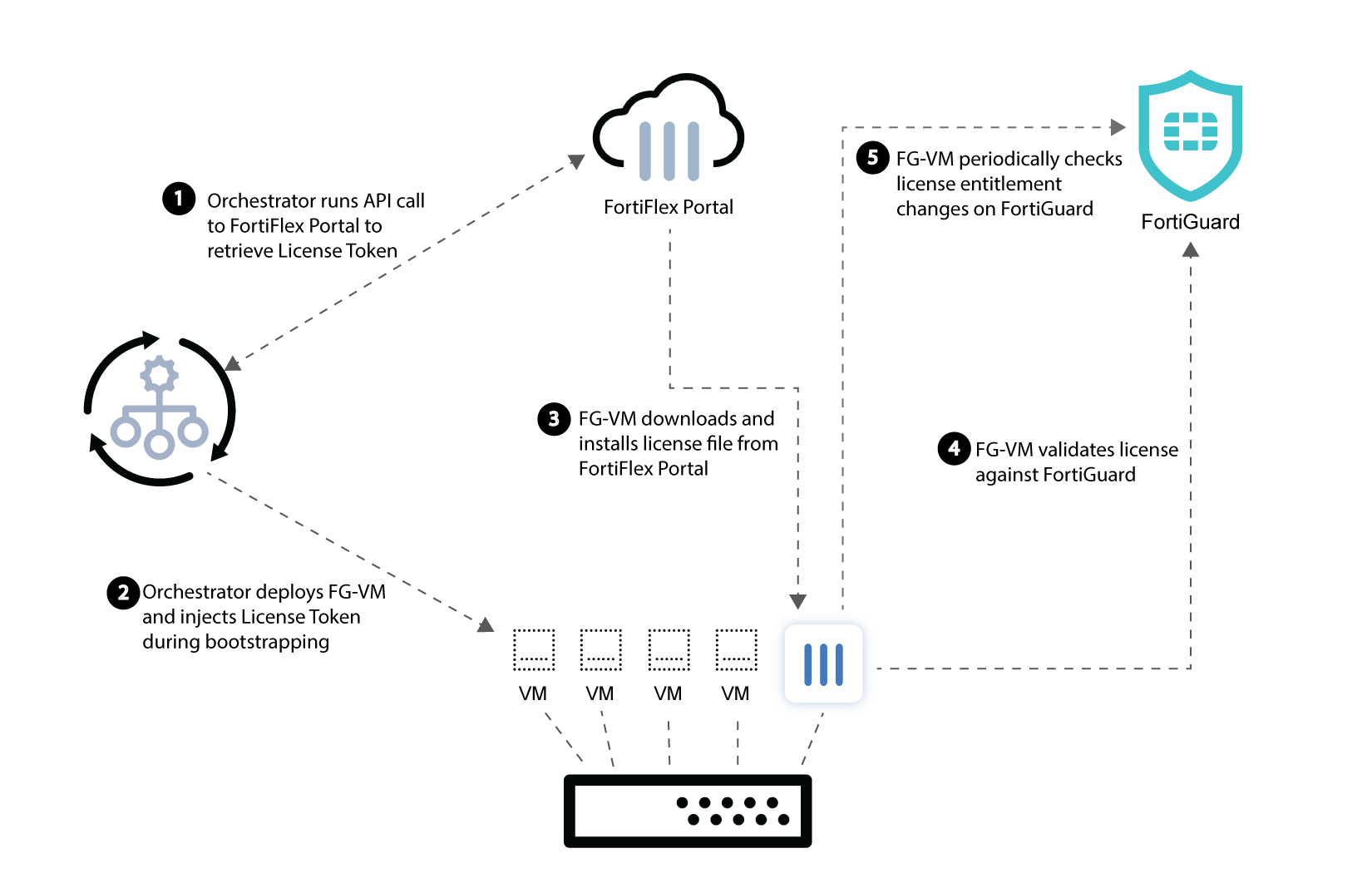
FortiFlex License Activation Workflow
Injecting the FortiFlex license

Injecting the FortiFlex license

Each FortiFlex entitlement has an associated license token that is automatically generated upon creation. To activate an entitlement, the license token must be injected into the target solution.

You can inject a FortiFlex license into a VM instance via the CLI or during the VM bootstrapping via Cloud-Init (KVM) or OVF template (ESXi).

Note

The commands execute vm-license-options count and execute vm-license-options interval allow for the customization of license token activation retry parameters. See VM license in the FortiOS Administration Guide for more information.

Requisites:
Injecting the FortiFlex license consists of the following steps:
  1. Ensure that the VM has Internet connectivity properly configured.
  2. Inject the FortiFlex License Token into the VM using one of the following methods:
  3. Confirm that the license token is injected
  4. Configuring web proxy tunneling for FDN
Note

Review specific product documentation information for more information on license token injection in the Fortinet Document Library.

FortiFlex License Activation Workflow