Fortinet white logo
Fortinet white logo

Examples

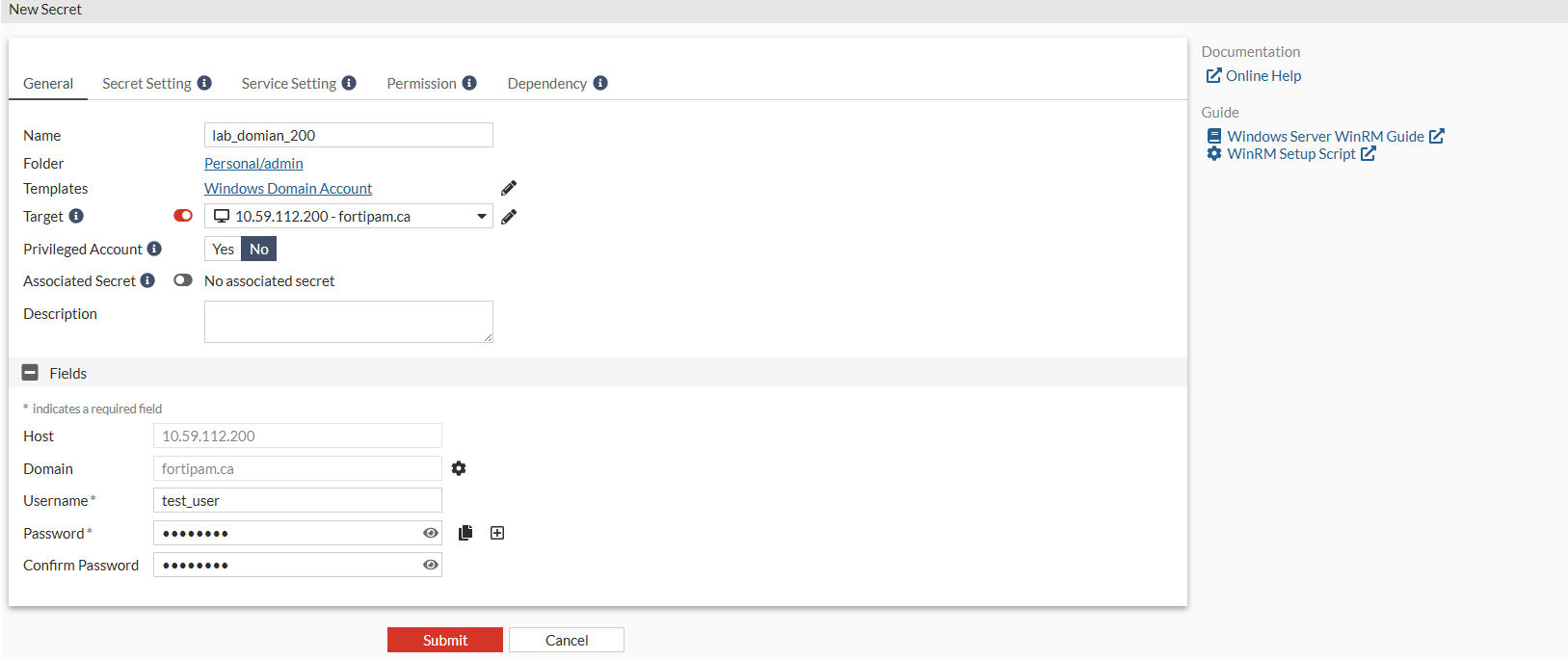
Creating a secret for the domain user

Creating a secret for the domain user

To create a secret for the domain user:
  1. Go to Secrets > Secrets.
  2. Select +Create.

    The Select a Secret Template page opens.

  3. Look for Windows Domain Account and click its icon.

    The New Secret window opens.

  4. Enter a name for the secret.
  5. In Target, select the first target created in Creating targets.
  6. Enter the username.
  7. Enter the password.
  8. Reenter the password to confirm.
  9. Click Submit.

Creating a secret for the domain user

Creating a secret for the domain user

To create a secret for the domain user:
  1. Go to Secrets > Secrets.
  2. Select +Create.

    The Select a Secret Template page opens.

  3. Look for Windows Domain Account and click its icon.

    The New Secret window opens.

  4. Enter a name for the secret.
  5. In Target, select the first target created in Creating targets.
  6. Enter the username.
  7. Enter the password.
  8. Reenter the password to confirm.
  9. Click Submit.